
#Introduction
Programming is not only writing code, it's also planning the code: deciding which features are needed and which aren't. I have my own system that defines how to plan programs and features, how to organize myself, and how not to forget ideas. In this article I want to tell you about it. Some parts of this system I came up with myself, some I stole from other people.
This article may be useful for beginner programmers.
#Example: a program for learning English words
Recently I made a GUI program for learning English words. Before I started it, I decided right away that I'd write this article, so from the very beginning I measured the time of every action and documented the writing of code, the ideas and the completion of todo items.
In the end I brought this program to an absolute finish in ≈40 hours of net time. I don't need any more features, nothing bothers me. That's very unusual for a pet project: their main property is that they get started but never get finished.
#2Building the product
#3Collecting ideas
Before you start a project, you always know that you want a program with some specific features: if you do this, that should happen. You don't know how it should work in every specific detail, but you know for sure that without certain details there's no point in making it at all. All of this needs to be written down and organized, so you can build on it later when writing code.
#4Chaotic idea collection
I take a file and name it ideas.md. From now on, all ideas for this project will live in it.
First you just dump everything that's in your head, without any order. I dumped it all, then reread it many times and added the things I hadn't written down yet. And I wrote down all ideas, even the craziest ones: you never know what might come in handy or happen later.
The chaotic idea collection took 20 minutes, and the result was this file:
(better not to read it, just get a sense of its size)
@341bd26/ideas.md diff
- I'd like to load words from text and from subtitles, so there should be a button that reads the clipboard
- So that when adding subtitles or text, all the words are looked through, and those that are already known or learned aren't added, while new words are shown for further adding
- Word adding interface
- Known or learned words are filtered out
- The English word is shown
- You're offered to add its Russian translation manually
- Or there's a button "I already know this word"
- So that for a given word you can see the context it's used in
- So that in a special file you can set up the keyboard layout, so the layout adapts automatically without switching layouts.
- You can swap the language of the questions and the answers
- How words are typed:
- A word that has never been typed must first be typed n times
- Words that were answered correctly 5 times are considered done for today
- Words that are answered incorrectly get a rating of -2
- The date when the person answered and how they answered is also tracked. If some word hasn't been typed for a long time, it needs to be repeated, and if repetition worked well before, the priority is lower.
- Only when a word earns a rating that's a multiple of 5 is the date when it happened recorded
- Priority of words for typing: each category is sorted in random order
- Words that haven't been typed 5 times
- Words that have a negative rating
- Words that have a rating less than 5
- Words that have a rating above 5, but all of this rating was earned more than 5 days ago
- Words that have a rating above 10, but all of this rating was earned more than 5 days ago
- Words that have a rating above 15, but all of this rating was earned more than 20 days ago (words that haven't been repeated for a long time)
- Words that have a rating above 20, but all of this rating was earned more than 20 days ago
- That's it, definitely nothing more is needed
- In the center of the screen there's the word to translate, below it the answer options are written as "____ __", and the _ must be separate
- Doesn't go well with words having multiple meanings, let it just be N fields of any length
- How to deal with words having multiple meanings
- For a given English word, a set of pairs of Russian words is stored, and likewise the other way around
- If an English word with multiple meanings is shown now, then below you need to type all of its added Russian meanings
- The statistics evaluate a pair (Russian word, English word)
- If some meaning of a word with multiple meanings is already learned or doesn't need repetition, it isn't shown for typing, it's just shown as text, so you can understand which meanings are typed and which aren't
- Statistics
- For each word, remember how many times it was typed, how many times correctly, how many times incorrectly.
- For each day, remember how many words were fully worked through today, how many words were worked on at all, etc.
- Try drawing the statistics with egui plots.
- Track the number of new words added per day
- Somewhere there should be a window to just see the number of all words in the system, the number of learned words and the number of words being learned
- When adding new words, you can say: I know this word; I don't know this one. So as not to learn already known words for nothing, and so that they aren't added as unknown from other texts.
By the way, at this stage it's extremely nice to be a fast touch typist, so you can write a lot of text without getting distracted by the typing itself.
#4Organizing the ideas
I have a principle: you should organize something and sort it into categories only in two cases:
- When you know for sure that this category has been used before and it works.
- You have a critical mass of elements of this category.
That's why in the previous step the ideas were written down chaotically, and now we can organize them: only now can you see which categories are present and which are absent.
This took 20 minutes too.
I wanted to write the program as fast as possible and get a result as fast as possible, so I split the ideas into different categories and tried to pick the ideas so that the first working version (MVP) could be implemented as fast as possible.
That's why I created a category "hard ideas", where I moved the things I want to implement, but that definitely shouldn't be in the first iteration.
In the end, the ideas file now looks like this:
@5387e15/ideas.md diff
organized ideas
Implement first
- General interface
- Adding words
- Via subtitles
.src - Via text
- Via subtitles
- The window for learning words is always shown and can't be closed, or it's attached to the background altogether
- Adding words
- Interface for getting words from text or subtitles
- There are two buttons: "add as text", "add as subtitles"
- Word adding interface
- Known or learned words are filtered out
- The English word is shown
- You're offered to add its Russian translation manually (a new line means a new meaning)
- There's a button "add word translations"
- Or there's a button "I already know this word"
- Word typing interface
- At the top, the English (or Russian) word is written
- At the bottom, N fields for typing all the meanings of this word
- Some fields may be gray with the words already written in, since these words are learned or don't need repetition right now
- To move down or to check the current word, you can press Enter
- Whether a word was typed correctly or incorrectly is shown only after all the words are typed
- For each word, dots show how many more times it has to be typed today
- Word typing order
- The first 2 times the word is typed with a hint from the program
- Then you need to type the word from memory 3 times today
- The next time, you need to type the word 5 times a day later or more
- At this stage the word is considered half-learned
- Then 5 times a week later or more
- Then 5 times a month later or more
- After that the word is considered absolutely learned
- Each mistake adds the need to type this word one more time
- Words in the queue
- Russian and English words are given mixed together
- Everything is mixed together
- Every word is iterated over to see whether it needs to be typed today and how many times
- How to deal with words having multiple meanings
- For a given English word, a set of pairs of Russian words is stored, and likewise the other way around
- The statistics evaluate a pair (Russian word, English word)
- Statistics
- For each word, remember:
- How many times it was typed, how many times correctly, how many times incorrectly
- All the milestone dates: when it was typed on the first day, on the second day, a week later, a month later
- For each word, remember:
hard ideas
Implement later
- Interface for getting words from text or subtitles
- The program always sees the clipboard if this window is open
- At the bottom, the text that's currently in the clipboard is written in gray
- Only the first 200 characters of this text are shown, followed by an ellipsis and the number of bytes the whole text takes up
- Word adding interface
- So that for a given word you can see the context it's used in
- Word statistics interface
- When it was added (date, number of days ago)
- How many times it was typed
- How many times correctly, how many times incorrectly
- All milestones (days after adding)
- Word typing interface
- There's a little
(i)button next to each word that you can press to see the statistics of this word
- There's a little
- Interface of the "keyboard layout" window
- You're asked to switch to the Russian layout and type all the English letters as if the English layout were on
- Likewise, with the English layout on, you're asked to type all the Russian letters
- This way the program learns the keyboard layout and saves it in the settings, to use it later so that you don't have to switch layouts
- Statistics
- Try drawing the statistics with egui plots.
- Somewhere there should be a window to just see the number of all words in the system, the number of learned words and the number of words being learned
- For each day, remember:
- How many words were fully worked through today
- How many attempts were made in total, how many correct, how many incorrect
- How much is due today
- How many words were added today
- How long the program was running (idle periods longer than 15 seconds don't count)
- You can get the statistics for all time by summing up the statistics for each day
to sort
#3Planning data structures and functions
Only now, when there's some vision of the program, can you start trying to write code. If you write code without the stage of collecting and organizing ideas, you can forget some small details, which you'll later have to squeeze in with a lot of pain.
And it's best to start the code not with writing actions, but with designing types/data structures and function signatures. By data structures I don't mean lists, trees, etc., but just enums and structs. I even heard this phrase somewhere:
Finding the right data structure is already half the battle.
And I really agree with this statement: how you're going to solve the whole problem really does depend on what your types look like. Enums play an especially important role, they describe the domain really well.
And that's why I can't understand how people can program in dynamically typed languages, where nobody ever writes types. I just don't understand what you gain by getting rid of types: in the long run it's a huge loss, and in the short run I don't see any gain either.
My answer to the question of why we need types is perfectly illustrated by a quote from Conor McBride, also a very well-known programming language theorist. In a thread, he complains that for the last 20–30 years programming languages have been designed so that types are inferred from the program, whereas it could have been done the other way around: you could write types, from which programs are then inferred. I think this is a very deep thought. And honestly, when I realized it, I changed my attitude to how I write code a lot. Because in fact types are a perfect projection of your application's domain model onto the code, and this projection will always be more up to date than the code, because if it suddenly stops being up to date, the code doesn't type-check. And from my point of view, this is the most important thing: to write a cool, correct, proper type, as well as your programming language allows. Even if your types aren't very powerful, there's always a way to design your system so that the types in it reflect your domain in the best possible way. Then the implementation becomes a mere technicality. In Idris there's even this thing: if you wrote the type correctly, the code can be derived by itself. But in real life, when we don't use such languages, as a rule, when you have a good type, you just write trivial code and everything is very simple and clear. And that's my answer to why we need types.

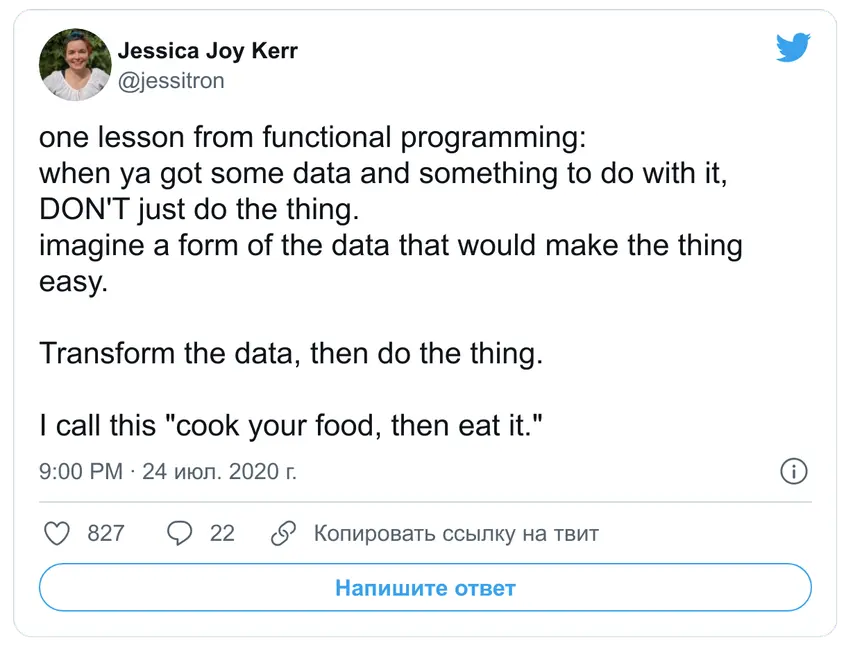
There's also the idea that to make writing code easier, you should think about how to represent the data in a form in which the problem is solved most naturally, and convert the data into that format:

png
From here on I'll be throwing commits at you, starting with @. I think the best way to look at them is to open one in a new tab, scroll through the diff and see roughly what happened. Or you can just ignore them, you won't lose much. Looking at what happened in the commits can be useful if you really want the details of how my development went.
After two commits (@a8549a3, @b79f219) and 1h 20m, I ended up with the following types, which from then on became the foundation of everything:
/// An iteration of learning a word: how long to wait since the last learning, how many times to repeat, whether to show the word while typing
struct LearnType {
    /// How many days to wait since the last learning
    wait_days: i8,
    count: i8,
    show_word: bool,
}

/// Typing statistics for a word, a day or overall
struct TypingStats {
    typed: i32,
    right: i32,
    wrong: i32,
}

/// Represents one Russian-English or English-Russian word pair in the statistics
enum WordStatus {
    /// We knew this word before, no need to learn it
    KnowPreviously,

    /// A trash word, an artifact of the approximate parsing of a text file or subtitles
    TrashWord,

    /// We're learning this word
    ToLearn {
        translation: String,

        /// When this word was last learned
        last_learn: Day,

        /// Learning stages of the word; when looking for what needs to be typed, we go through the whole array
        learns: Vec<LearnType>,

        /// Statistics
        stats: TypingStats,
    },

    /// We know this word
    Learned {
        translation: String,

        /// Statistics
        stats: TypingStats,
    },
}

struct WordsSaved(BTreeMap<String, Vec<WordStatus>>);
A lot of ideas were built into these structures right away, including the statistics. While writing this code, I reread all the ideas many times, checking that nothing got lost and everything was accounted for from the very beginning.
Next I started planning the structures and methods for the GUI. I write the interface with ImGui, which I wrote a separate article about. So I'll spend minimal time on the interface, and planning it is as easy as it gets.
I planned the interface in 32m: @0cab890, and after this planning even the main data structures got a little better.
#3Writing code
Then in 1h I wrote the logic code: @96eb608.
Then in 2h 45m I wrote the interface code up to a minimally working state: @7b8de3d.
By the way, writing working code on top of planned functions and types is extremely pleasant, the code flows so easily and quickly.
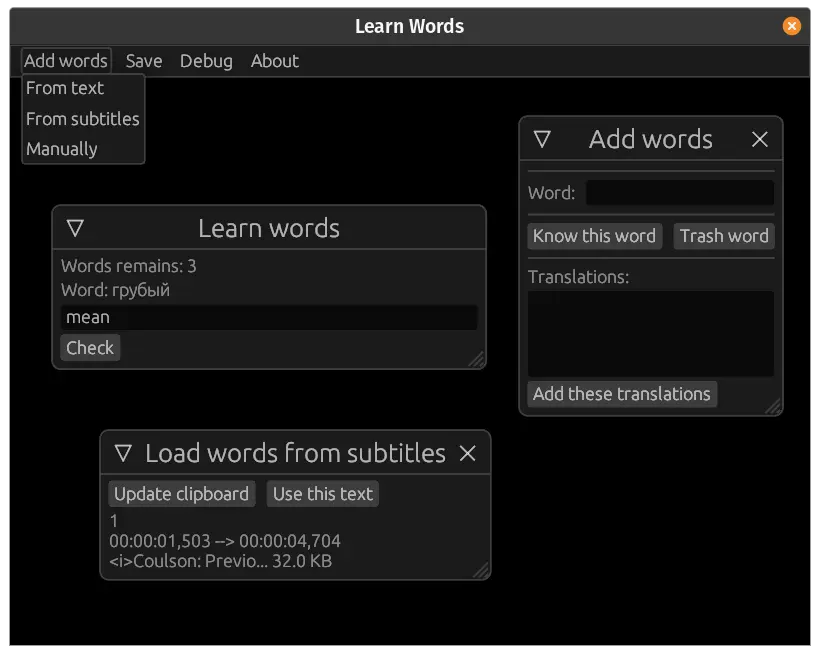
So, the net time is at 6h 16m, and the program looks like this:
png
Only three windows and the basic functionality work here.
#3Todo lists
So, I've written the most minimal prototype. In theory, it's already usable.
We don't need the ideas file that much anymore, so we remove everything that's implemented from it: (it became really small)
@47b0669/ideas.md diff
ideas of unknown usefulness
- So that when adding words, their frequency is measured, even the frequency of the known ones, and it's simply added to what's already stored, so that you can see the frequency of the learned words. Although this would also require building some complicated interface.
- Word adding interface
- So that for a given word you can see the context it's used in
- Word typing interface
- There's a little
(i)button next to each word that you can press to see the statistics of this word
- There's a little
- Word statistics interface
- When it was added (date, number of days ago)
- How many times it was typed
- How many times correctly, how many times incorrectly
- All milestones (days after adding)
And we create a todo file, where we'll put specific todo items to be done:
@47b0669/learn_words.todo diff
general:
  ✔ make it easy to navigate the word writing interface @done (21-07-29 23:34)
  ✔ subtitles should be able to return an error, and it should be shown in the window @done (21-07-29 23:41)
  ☐ make it possible to navigate the word typing interface with enter
  ☐ make every word know its current level
  ☐ read the (Words, Settings) combination from the file, and save it the same way
  ☐ measuring time in the program
    + when the mouse or keyboard is idle for more than 15 seconds, the program goes into pause mode and stops measuring time, and this is shown full screen
    + today's time in the program is shown at the bottom
    + the amount of time in the program is remembered for every day

layout:
  ☐ make a window for the keyboard layout
    + checkbox "use automatic layout switching", and if it's checked, then everything else is shown
    + type all your English characters
    + type all your Russian characters
    + if you can't type a character, put a space
    + check whether the two different languages happen to have the same characters, and if so, reject such a layout
    + you can put enter for convenience
    + compare the number of characters without enter, and say when they match and when they don't
    + button "use this layout"
  ☐ make input field widgets that can detect the current layout and the answer language and automatically substitute the letters
  ☐ the layout should be stored in settings

statistics:
  ☐ statistics of the number of words in the program:
    + known
    + trash
    + being learned, for each level
    + fully learned
  ☐ a basis for measuring every day
    + measure the number of attempts
    + new unknown words
    + updated either manually, or when the program is closed, or when the statistics window is opened
    + also measure the number of attempts in general
  ☐ show today's statistics at the bottom
  ☐ remember the number of words of each level every day
  ☐ a contribution grid like on GitHub
    + you can choose which parameter to show, taking into account everything that's known for the current day
  ☐ a graph of the number of memorized words over all days, roughly what area it covers, with stems

wasm:
  ☐ storage in cookies
  ☐ use quad_rand
  ☐ save the progress automatically when the tab is closed
  ☐ buttons for exporting and importing your data, in the menu under Data -> {Import, Export}
Here I should digress a bit about how I keep todo lists. Some people do it with GitHub, others with a phone app, and I do it with a text editor extension. I write in Sublime + PlainTasks, and there's also a similar extension for VSCode: Todo+.
Keep in mind that this file looks really good only in Sublime + PlainTasks; unfortunately, markdown doesn't format it in any way.
Now you can implement one item at a time and see the result right away.
I always keep all my tasks as todo items. If it happens that I've done something that isn't there, I just write it down and then immediately mark it as done, and my brain gives me at least a little hit of dopamine for that.
I also have a .todo file for each project, and I keep all these files in one place, because committing it into the project is weird; and keeping it in the project folder and hiding it with .gitignore is bad, it'll get lost for sure.
I even have todo files for life, for medicine (which doctors to visit) and so on. Very convenient self-organization.
#3The usual development cycle
Now I do the todo items and gradually commit the changes they bring. While I'm doing some items, ideas for others may come to mind, and I put them into the todo as well. Something really radical goes into the ideas.md file, so as not to forget it, but also not to force myself to implement it.
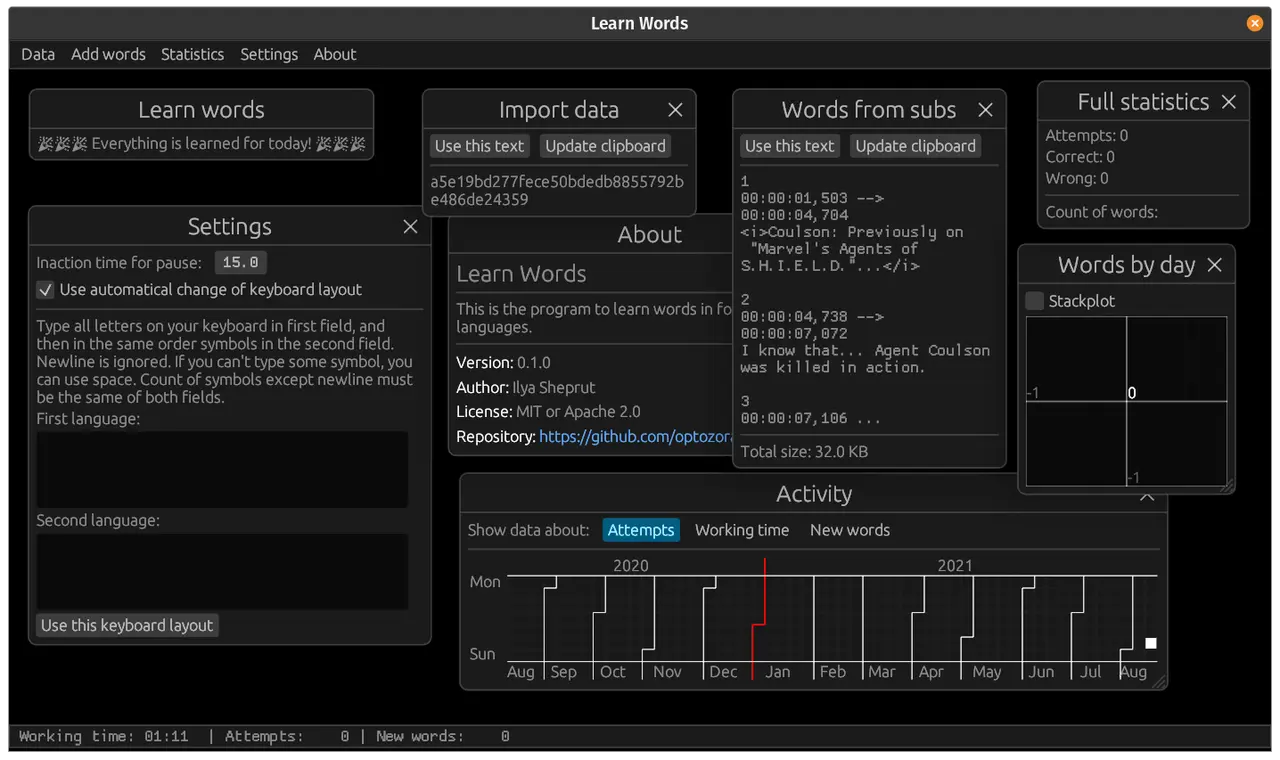
The net-time timer shows 21h 21m, and here's the result:
png
There are many more features here already, and I started using the program fully myself. But while using it, a lot of pain points came up, and I wrote down even more todo items.
The timer shows 33h 23m of net time, and I publish an article about this program.
At the 41h mark I publish the second version, which, you could say, is the final version. I don't need anything else from the program, I've done all the main todo items.
The program can be considered finished.
#3What to do with completed todo items
At this point I've done almost everything, and the todo file has a lot of lines marked as done or cancelled. When there are too many of them, I just move them all down to the "Archive" section. I don't delete the lines, simply so as not to lose information, and simply because it's nice to see how much work I've done. Of course, I move the completed items down not only when I finish a project, but whenever there are too many items; this happens from time to time in some of my projects. You can look at the current todo file here:
@42b5e72/learn_words.todo link
general:
  ☐ in the stackplot, put the smallest areas at the very bottom and the largest at the very top

articles:
  ✔ tell about quad-storage @done (21-08-10 21:52)
  ☐ write an article about how I made this program
  ☐ on September 1, publish an article about the results of a month of using this program

distant future:
  ☐ https://github.com/emilk/egui/issues/595
  ☐ depending on what's turned off in the stackplot legend, exclude it from the calculations; this requires adding a feature to egui

refactoring:
  ✔ tidy up the ui function, move the input fields with all their features into a separate function so there's no more of this copy-paste, and the data into a separate struct @done (21-08-10 19:27)
  ☐ to use less memory and make the program faster by reducing the number of allocations, use string ids and store all strings in one structure
  ☐ change it so that words doesn't store an array where a word can be either learned or to be learned, but at the top level there's (trash, known, (learn, and only inside learn there's an array (either learned or being learned))) (questionable convenience)
  ☐ try to use GATs

-------------------------------------------------------------------------------------------------------------
-------------------------------------------------------------------------------------------------------------
-------------------------------------------------------------------------------------------------------------
ARCHIVE:
-------------------------------------------------------------------------------------------------------------
-------------------------------------------------------------------------------------------------------------
-------------------------------------------------------------------------------------------------------------

general:
  ✔ make it easy to navigate the word writing interface @done (21-07-29 23:34)
  ✔ subtitles should be able to return an error, and it should be shown in the window @done (21-07-29 23:41)
  ✔ make every word know its current level @done (21-07-30 14:18)
  ✔ read the (Words, Settings) combination from the file, and save it the same way @done (21-07-30 14:23)
  ✔ measuring time in the program @done (21-07-30 15:01)
    + when the mouse or keyboard is idle for more than 15 seconds, the program goes into pause mode and stops measuring time, and this is shown full screen
    + today's time in the program is shown at the bottom
    + the amount of time in the program is remembered for every day
  ✔ make it possible to navigate the word typing interface with enter @done (21-07-31 23:24)
  ✔ make a basic about window @done (21-07-31 23:35)
  ✔ looks like the clipboard leaks in wasm when Russian characters are used. apparently the number of chars and the length in bytes get mixed up, need to fix it @done (21-08-01 00:10)


layout:
  ✔ make a window for the keyboard layout @done (21-07-30 19:30)
    + checkbox "use automatic layout switching", and if it's checked, then everything else is shown
    + type all your English characters
    + type all your Russian characters
    + if you can't type a character, put a space
    + check whether the two different languages happen to have the same characters, and if so, reject such a layout
    + you can put enter for convenience
    + compare the number of characters without enter, and say when they match and when they don't
    + button "use this layout"
  ✔ make input field widgets that can detect the current layout and the answer language and automatically substitute the letters @done (21-07-30 19:30)
  ✔ the layout should be stored in settings @done (21-07-30 19:30)

statistics:
  ✔ a basis for measuring every day @done (21-07-30 15:34)
    + measure the number of attempts, correct and incorrect
    + new unknown words
    + updated either manually, or when the program is closed, or when the statistics window is opened
    + also measure the number of attempts in general
  ✔ show today's statistics at the bottom @done (21-07-30 15:34)
  ✔ remember the number of words of each level every day @done (21-07-30 15:34)
  ✔ statistics of the number of words in the program: @done (21-07-30 16:23)
    + known
    + trash
    + being learned, for each level
    + fully learned
    + computed from words when the program starts
  ✔ a graph of the number of memorized words over all days, roughly what area it covers, with stems, by level @done (21-07-30 17:40)
  ✔ same as above, a graph of the number of correct and incorrect attempts @done (21-07-30 17:40)
  ✔ a contribution grid like on GitHub @done (21-07-30 23:36)
    + you can choose which parameter to show, taking into account everything that's known for the current day

wasm:
  ✔ buttons for exporting and importing your data, in the menu under Data -> {Import, Export} @done (21-07-30 18:03)
  ✔ use quad_rand @done (21-07-31 14:51)
  ✔ storage in cookies @done (21-07-31 22:20)
    + https://developer.mozilla.org/en-US/docs/Learn/JavaScript/Client-side_web_APIs/Client-side_storage
  ✔ try compiling for wasm @done (21-07-31 23:12)
  ✔ save the progress automatically when the tab is closed @done (21-07-31 23:12)

refactoring:
  ✔ make a ClosableWindow trait and a process_window function that handles a window that can be closed, so as not to copy-paste this all the time. or better, a struct that wraps around the window struct, can close itself, constructs the window itself, and itself tracks in the ui function when the window is being closed @done (21-07-30 16:06)

critical:
  ✔ if you just press a mouse button without moving the mouse, the pause pops up @done (21-08-02 21:20)
  ✔ to read the clipboard, the user has to press ctrl+v themselves, so maybe remove the automatic reading of the clipboard, same for ctrl+c @done (21-08-02 21:54)
  ✔ hints should be given with a space, otherwise the cursor hides them @done (21-08-02 21:55)
  ✔ autosave after every word @done (21-08-02 21:56)
  ✔ if you press use this text with an empty text, there's a panic, file: "src/main.rs", line: 1185, col: 38 @done (21-08-02 22:01)
  ✔ looks like you can't paste text longer than 32768 characters @done (21-08-02 22:37)
  ✔ redo the settings for the number of learning repetitions, so they aren't copied into every word but are global @done (21-08-02 23:12)
    + then they need to be settable in the settings window

do next:
  ✔ when typing a word with a hint, you need to type not only the translation of the word, but the word itself too. this is needed because I'm trying to speed up and don't read which word with a hint I'm typing @done (21-08-03 17:22)
  ✔ probably you should learn fewer words per session, not all the added ones. make a setting that lets you take N (let it be 20 for a start) words into a pool and learn them, and only when they run out, continue learning. @done (21-08-03 17:48)
  ✔ a word editor-viewer window, where you can search for words with fuzzy search, and where the internals are shown right away @done (21-08-03 20:20)
  ✔ automatically open the word viewer window, filtered by the word currently being added @done (21-08-03 20:20)
  ✔ a window for editing one word @done (21-08-03 22:16)
  ✔ make a little pencil next to a word, which opens a window for this word and lets you edit it @done (21-08-03 22:16)
  ✔ add the feature that shows the context of a specific word after all, and also show how often it occurs in this text @done (21-08-03 23:02)
  ✔ it should be possible to choose the number of new words and the number of words to repeat @done (21-08-04 14:57)
  ✔ after adding text or subtitles, a window with info should be shown: @done (21-08-04 17:20)
    + total words
    + unique words
    + filtered out
      + known (known, trash, learned)
      + being learned (tolearn)
    + unknown
  ✔ synchronous subtitles, where both the Russian and the English versions are shown at the same time @done (21-08-04 23:51)
    ✔ sort out the text highlighting when searching @done (21-08-04 23:55)
    ✔ when the input is empty or new results are found, the scroll should jump to the beginning @done (21-08-04 23:57)
    ✔ 0 always means no scroll @done (21-08-04 23:57)
    ✔ make the scroll target the label only after the button is pressed @done (21-08-04 23:57)
    ✔ remove the array in the word search @done (21-08-05 00:03)
  ✘ extract the common part in the find_whole_word code @cancelled (21-08-05 00:14)
  ✔ make the zeroth element not shown in the buttons, not highlighted, and impossible to get to @done (21-08-05 00:14)
  ✔ in the word adding window the context can drift off to the right @done (21-08-05 13:52)
  ✔ ability to change the scale in the settings @done (21-08-05 14:02)
  ✔ there should be a checkbox that allows panning the plot @done (21-08-05 14:19)
  ✔ need a light theme, because the dark one is unpleasant for the eyes @done (21-08-05 14:35)
    + remember the theme in the settings
    + draw the whole window white or black depending on the theme
    + remember the colors for various things like activity depending on the theme
  ✔ use a proper random generator that's seeded with the current time @done (21-08-05 19:22)
  ✔ after typing a word incorrectly, you need to type it again with a hint, and it won't let you move on until you write it correctly @done (21-08-10 16:34)
    + after typing a word incorrectly, you need to write it again, even several times
  ✔ skip the check window for typing with a hint @done (21-08-10 16:34)
  ✔ after typing a word, it should be possible to invert the correct and incorrect results @done (21-08-10 16:34)
    + use right_to_left there
    + for this, attempts need to be registered not after they're typed, but after the "next" button is pressed
  ✔ if backspace is pressed on an empty field or a button, the focus should be requested back @done (21-08-10 17:54)
  ✘ switch Words to storing two different languages, and when choosing words for typing, count only English words @cancelled (21-08-10 18:21)
  ✘ sort the words for adding not alphabetically but in the order they occur in the text, so as not to read the same sentences again @cancelled (21-08-10 21:51)
  ---
  ✔ in the add words window there should be a field where you can add the known translations of this word @done (21-08-10 18:12)
  ✔ make a button for skipping the words being added @done (21-08-10 18:12)
  ✔ need a way to undo the previous press when adding a word, otherwise you can be quickly pressing that you know the word, and oops, you skipped one @done (21-08-10 18:12)
    + remember one word, and remove it from words with the removal method if the back button was pressed
  ---
  ✔ when choosing words, add their translations right away, and stop choosing when more than the needed number was collected or all the words ran out @done (21-08-10 19:02)
  ✔ the oldest words should be chosen first in the word choice window @done (21-08-10 19:02)
  ✔ write how many more times this word has to be typed today @done (21-08-10 19:12)
  ✔ pressing backspace on a button should send you back @done (21-08-10 19:16)
  ✔ there should be a button for canceling the current typing session and the choice of the number of words to learn @done (21-08-10 19:26)
  ✔ probably it's better to first type all the words you don't know with a hint, in random order, and only then type all the words that need to be typed without a hint; and it shouldn't be just a random choice, the whole array should be properly shuffled, same for everything else, so that the same word never comes twice in a row @done (21-08-10 19:46)
  ---
  ✔ when a translation is renamed, it should be renamed properly everywhere @done (21-08-11 18:15)
  ✔ save everything after a word is changed @done (21-08-11 18:15)
  ✔ in the edit word window it should be possible to delete a specific translation of a word and to add new ones; in the day setting window today should be set automatically @done (21-08-11 18:25)
  ---
  ✔ make it possible to set the levels and the number of repetitions in the settings. @done (21-08-11 18:39)
  ---
  ✔ make the current day computed in local time, because at 0:00 my day wasn't today @done (21-08-11 19:04)
  ✘ contribute user_dpi to egui-miniquad @cancelled (21-08-11 19:27)
  ✘ maybe try showing the panic on the screen @cancelled (21-08-11 19:27)
  ✔ bug: not all words get chosen when you choose for repetition something that has no translation to repeat @done (21-08-11 23:02)
  ---
  ✔ move to egui-web, egui-glium @done (21-08-11 22:25)
  ✔ add the ability to download the export as a file @done (21-08-12 14:58)
  ✘ add a button that selects everything @cancelled (21-08-12 14:58)
  ---
  ✔ optimize the colors in the light theme, maybe via a separate window @done (21-08-13 19:18)
  ✘ make scale changing work on the web @cancelled (21-08-13 20:24)

not critical:
  ✔ looks like the native app doesn't want to save statistics to a file @done (21-08-01 23:06)
  ✔ looks like the word adding window doesn't filter out known words @done (21-08-01 23:12)
  ✔ it's impossible to type a space because of the character substitution @done (21-08-02 21:06)
  ✔ the words should be huge, not a plain label @done (21-08-02 21:06)
  ✔ make it possible to delete words @done (21-08-03 23:15)
  ✘ when typing a word, it should be possible to see its statistics @cancelled (21-08-03 23:15)
  ✘ when typing a word in the attempts, it should be possible to edit this word (like when I sometimes left an extra ending or something like that) @cancelled (21-08-03 23:15)
  ✔ in the window for adding words from text, show how many were unique and how many were filtered out @done (21-08-05 14:35)
  ✔ add learned translations to the word adding window @done (21-08-05 14:36)
  ✘ in the github stat, dim the elements that are 0 down to dim 0 @cancelled (21-08-05 14:39)
  ✘ it should be possible to add aliases for a word, like if you typed it differently, it still counts as correct. @cancelled (21-08-11 19:04)
    + then there should be a button after typing a word that not only cancels the wrongness of the current answer, but also adds it to the aliases at the same time
+ this isn't needed, since there's an invert button#2Time spent on this program
By the way, if you're curious how much time was spent on each item of this program, that information is in the file below. The time measurements were committed together with the feature I was writing, so you can find additional information through the commits and blame.
@aba59d5/video.md link
information
- (the time doesn't include writing the articles)
- writing down the first ideas: 20 minutes
- organizing them: 20 minutes
- planning the data structures related to the main logic, without the interface: 1 hour 20 minutes
- planning the interface structures and methods: 32m (2:32)
- writing the code of the main logic: 1 hour (3:32)
- writing the interface code up to a minimally working state: 2h 45m (6:16)
6h 16m-------------------------------------------------- Minimally working state- did two items and planned further ideas in the todo: 45m (7:02)
- the timer got reset by accident
- three general items: 47m (0:47)
- the basis of the statistics: 34m (1:21)
- refactoring the windows: 30m (1:51)
- implementing the statistics and other small improvements: 1h 53m (3:44)
- keyboard layout: 1h 4m (4:48)
- github-like contribution grid: 3h (7:44)
- wrote quad-storage: 1h 49m (9:33)
- made it run in wasm, fixed bugs and made small additions: 1h 50m (11:23)
- reset the timer
- writing the article about the program: 2h 56m
21h 21m-------------------------------------------------- Moderately working state- finished fixing all the critical items: 1h 30m
- started the timer
- made it possible to choose the number of words: 44 minutes (0:44)
- made it possible to search through all words with fuzzy search, and made it work when adding a word: 1h 2m (1:46)
- made a window for editing one word: 53m (2:39)
- added showing the context of a given word from the text: 46m (3:15)
- for a session, you can choose the number of new words and the number of words to repeat: 21m (3:36)
- added output of the number of words in the text after adding it: 20m (3:56)
- the synchronous subtitles feature: 3h 26m (7:22)
- small features: 57m (8:19)
- switched to another random number generator: 10m (8:29)
- reset the timer
- finished the article about the program, taking into account the new features and usage: 2h 3m
33h 23m-------------------------------------------------- First release- repeating words after an incorrect input and inverting the results: 1h 48m
- improvements to the add words window: 20m
- choosing translations when choosing words, and choosing the most overdue words: 43m
- word typing improvements: 45m
- edit word window improvements: 30m
- setting the number of repetitions in the settings: 11m
- computing the current day correctly with the time zone in mind: 37m
- moved to egui_template: 2h 13m
- wrote about the second release: 30m
41h-------------------------------------------------- Second release- added downloading the statistics as a file: 1h 15m
- optimized the colors in the light theme: 1h 2m
- couldn't make scale changing work on the web: 1h
- writing the article about imgui: 2h 44m
- writing the article about how I write programs: 1h
#2An example of a complex feature
There was one very complex feature in the program, and its implementation is interesting to look at separately. It's the synchronous subtitles feature. The point of it is that you can load Russian and English subtitles at the same time and view them side by side.
When it comes to such a complex feature, you need to think it through well.
And a feature needs not only to be thought through well, you also need to figure out how to add it to the program with minimal effort, so that you have to redo as little as possible. Initially I wanted to add this feature as part of the window for adding words from subtitles, but I realized that this would require having Russian subtitles for every English subtitle file, which didn't fit in well. Then it dawned on me to simply make this feature a separate window, and everything immediately fell into place.
Here's the result of thinking it through, in the ideas.md file:
@80a5703/ideas.md diff
...
synchronous subtitles
- this will be a separate window that can be given a specific word, and it will search for all of its occurrences in the first provided text
- the window for adding has two text input fields: Lang 1 (to search words), Lang 2 (translation of Lang 1).
- the display window has a method that lets you put the needed word into the search if the window is open. unlike the search window, this window doesn't open automatically
- uses column for the window for pasting subtitles
- uses grid to show them side by side. since there can be empty spaces on both sides.
- uses code similar to scrolling to select the element to scroll to
- iterates over both subtitles at the same time and moves the current time pointer; if the current time overlaps with something in the other language, joins them into one
- the window also shows the element number on the left, so the grid consists of 3 columns
- if one phrase in one language overlaps with several in the other language, it's shown only for the first one
- there's a checkbox to search by whole words or by substrings
...
In the process it became clear that this feature is more like a competitive programming problem than ordinary code. The problem is that the subtitles don't owe me anything. I have no guarantee that one line comes after another, or that the phrases in English and Russian will have the same timings. And this had to be taken into account.
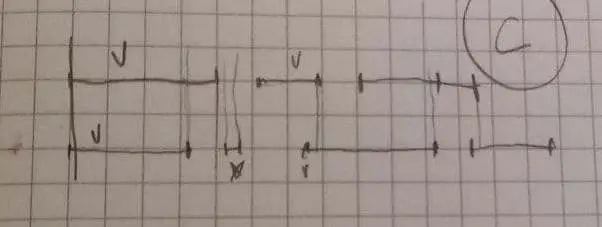
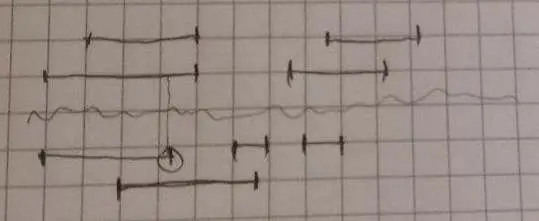
First I planned the algorithm for the case where the subtitles are well-behaved. In the picture below, time goes from right to left, the Russian subtitles are at the bottom, the English ones at the top.
jpg
Then I picked the worst general case and started planning the subtitle algorithm as in the picture. Everything is the same as in the previous one, only English and Russian are separated by a wavy line. You can see that here the guarantee that all lines in one subtitle file follow one another is violated.
jpg
This is where competitive programming skills come in really handy, because you need to:
- Consider the edge cases.
- Find out what guarantees you have about the input data, spot the catch.
- Try to come up with an algorithm without hacks, so that implementing it doesn't take more hours than the contest lasts.
- Make the algorithm run in acceptable time.
But I decided not to care about the speed of the algorithm, because I don't have billions of lines, a thousand at most. And I looked for each matching line with a dumb linear search. And in practice there are no slowdowns at all when adding synchronous subtitles.
So I highly recommend leveling up in competitive programming on codeforces. LeetCode is rubbish, because it measures the running time of programs badly, and the problems there are weak in general.
By the way, I use paper only when I need to draw something or write math formulas; in all other cases typing text on a keyboard is a million times faster. So personally I advise you to write down ideas and todo items not on paper.
#2About net time
I measured my working time, and you can see that the net time came out to 40 hours. What does that mean? Does it mean I could have made this program in one work week? No.
My net time was measured only while I was working; I didn't count breaks. Also, I didn't work 8 hours a day, but less: sometimes 2, sometimes 4. And most importantly, between these sessions I had long breaks in the form of rest and sleep. So that may be the reason why I worked so efficiently.
At a job we work with breaks, so out of an 8-hour working day, the part that's really productive always turns out smaller. They say it's 4–6 hours.
And even if you wanted to work perfectly for 8 hours every day, so that all these 8 hours were net time, you wouldn't last long. You'd be tired the very next day. And if you aren't, then in the long run burnout and mental health problems await you.
So all these initiatives to switch to a 4-hour or 6-hour working day make sense.
#Example: a feature for Portal Explorer
This is an example of how I added a nontrivial feature to another program.
My task was to make it possible for the camera to switch between different points, so that these points could be set in advance and the user could switch between them. This was needed for upcoming scenes.
This feature turned out to be one of those where I didn't have the slightest idea how to implement it.
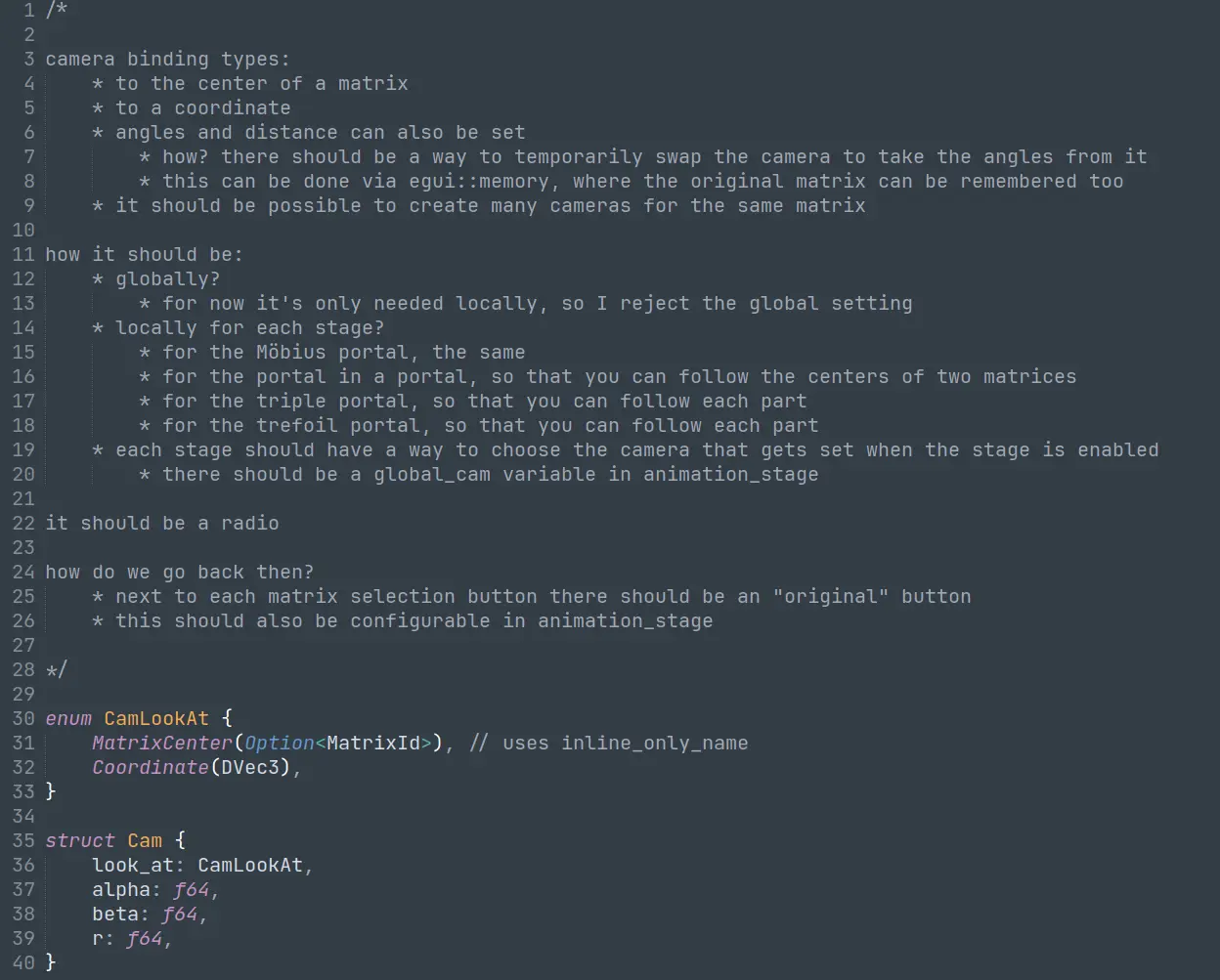
So first I sat down and started writing out questions and answers to them. The most important thing here is to think through how the feature will fit into the existing structure of the program. I reasoned in the form of text. When some first understanding appeared, I sketched out a few structs and enums. You can see the result of the reasoning and the types in the screenshot below:
png
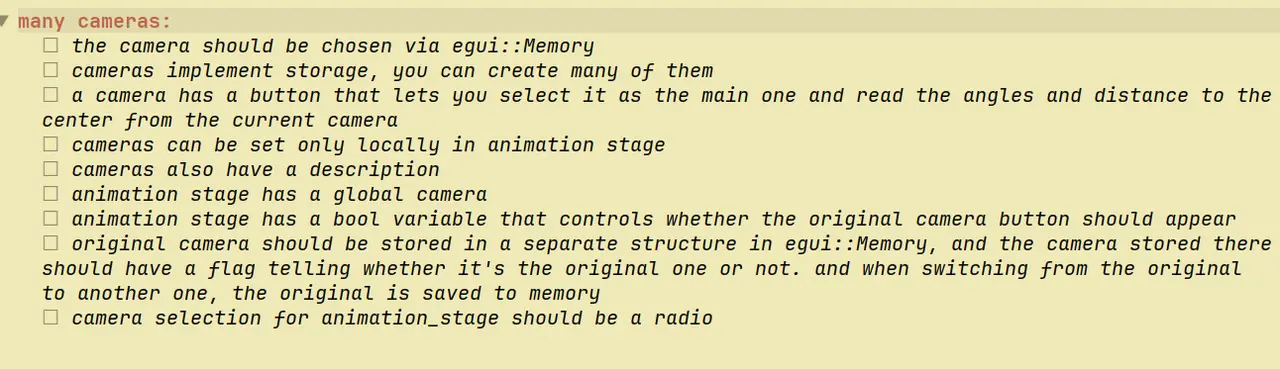
After that I thought about it some more, worked through all the unclear spots and resolved them, the picture came together in my head, and I decided to write down the todo items that need to be implemented for this feature to be fully done; that's the second screenshot.
png
Now, after everything became clear and understood in my head, I could start cranking out code very efficiently.
And then the code was successfully implemented. Of course, I forgot a couple of things during the planning, but there's no way around that.
#About pet projects
A few thoughts about how to do pet projects; I think they fit the spirit of the article.
#2Looking for alternatives
My program for learning words is similar to another program: Anki. I found that out only after writing my program, so I want you not to repeat my mistakes.
Look for alternatives more thoroughly, study them in depth, read articles about them and use them. After all, as everyone knows, the best project is the one you didn't have to make.
If I had bothered to search properly for programs for learning words, instead of putting up with the inconvenience of Duolingo and the like, I wouldn't have spent all this time writing my own program; I could have written just a separate module for working with subtitles, for example.
Well, or if your goal is to learn some technology through a pet project, then this advice doesn't apply: here reinventing the wheel once again is a sacred duty.
#2Not doing things matters more
I'll just quote Nikita Prokopov (tonsky):
Let me tell you about the main rule of pet projects. The main rule of pet projects: figure out how to do nothing.
Many programmers might think that doing nothing means automating something. No, on the contrary, automation adds headaches, and we want to avoid them. For example, under my previous post about "passive code is dead code", people recommended that I not torment the user with constant logouts, but create a test user and automate:
"Scripts. A scheduler in CI runs tests written in pytest/junit/whatever, draws pretty pictures, spams the hell out of you with notifications if something goes wrong. You just need to decide who's responsible for reacting to the notifications."
This is, of course, the way for normal systems, where programmers are paid a salary so that they sit tight and do what they'd never voluntarily want to do themselves.
But in pet projects, unfortunately, nobody pays you a salary, so you have to adapt. What's wrong with this suggestion?
First, it's a lot of work. The scripts have to be written, all this machinery has to be set up. Second, it's a lot of maintenance: you have to keep an eye on the CI and react to the notifications. Third, all of this will break, it has to be looked after, and you clearly won't feel like doing that, because it always breaks at the wrong moment, and you don't have time for the project every week.
The trick with pet projects is to fool yourself and manage to make something you can show people before you get tired and bored. And you will get tired and bored, trust me. That's why the amount of irrelevant work has to be cut hard and mercilessly. And that's why I'm so happy with the authorization solution: there's no work, and the testing gets done.
The classic illustration of this principle is "don't write a blog engine". Because you'll get tired before you write the first post. People who host on GitHub Pages with a ready-made template or on WordPress are the ones who are interested in solving the problem; people who write an engine are the ones who are interested in procrastinating. That's why you're reading this text in Telegram and not on some homemade site with its own compiler: I'd still be writing that compiler.
Another recent example is Roam Research. The guys have been running with no server at all for five or seven years, they just dump everything into Firebase, and it's fine, it works, they've raised money. There isn't a single server in their whole infrastructure. Then the creator of Athens Research came along, decided to clone Roam but bother even less, and didn't even use Firebase. He just made a local client, and even did without authorization. And he still raised 2 million. A legend.
All this illustrates one principle: the less work you come up with for yourself, the higher the chances that you'll finish it all. And conversely, if you do things "the normal way", "properly", you'll never finish. Because summer, beer, kids, the couch, friends or the PlayStation beat "relaxing with some programming" 100% of the time. Actually, anything at all beats it. And that's normal, there's nothing you can do about it, you just have to figure out how to work under these conditions.
#2Prototyping
In the early stages you need to implement as few features as possible, so that you see a result and have a chance of finishing the project; otherwise you'll burn out if seeing the first result takes 40h of net time. After that you should add only the most critical features, so that you see a result again and know that at any moment the program does as much of what you want from it as possible.
It's also extremely important to get a result quickly and start using it right away, because you can't know whether you need some features until you've actually used the program.
That's why ImGui works great here, for prototypes or pet projects. It speeds up development.
#2Throw away complex features right away
How did I manage to make the program for learning English words so quickly?
Because at the very first stage I threw away the hardest features:
- Having a built-in dictionary
- Word normalization (removing -s, -ing, -ed, etc.)
- A retained-mode interface
Thanks to this, I spent time only on fighting myself. Without fighting other libraries.
Such things have to be thrown away in advance, otherwise you'll never finish your project. At first everything should be dumb and manual.
If your project involves something very complex that can't be thrown away, I advise you to think about whether you should take on this project at all, or do something simpler right now.
#Automation
Right now there's all this hype around things like GitHub Copilot, which supposedly write code for programmers, and supposedly blah blah blah, machines will replace programmers.
Look at this article again. Can this kind of thing be automated? This is real thinking, which programming requires even from a junior. It can't be automated until strong AI is created. And until then, Copilot will only be a tool in a programmer's hands that makes development a little easier.
And when strong AI is created, any human labor on planet Earth will become pointless, so there's no point in worrying about programmers specifically. We'll all become useless together.
#Conclusion
This method isn't perfect, it's more a collection of ideas than a step-by-step guide to follow every time. I hope this article nudges you to look for your own way of planning programs, one that will make you more efficient.