
#About my English
Honestly, school and university never really taught me English: I did all the assignments, but reading and writing texts is still very hard for me. A couple of years ago I realized that if I didn't do something myself, my English would stay at a very low level forever.
So I promised myself to watch everything with English audio and Russian subtitles whenever the original is in English. Series and films sound much better in the original; I got used to watching the screen and reading the text at the same time, and I also picked up a lot of expressions and unexpected meanings of words (for example, in radio talk "copy that" = "принял" ("received")). You could say my level went up thanks to this. But after a year I felt that I had hit a plateau.
So I moved on to the next step and tried watching Futurama with English subtitles. I even mostly understood what was going on, but a lot of sentences slipped past me. I watched about 4 seasons this way, and I wouldn't say I leveled up at all. Recently I watched 2 seasons of "Agents of S.H.I.E.L.D." with English subtitles, and this time I understood more. But nothing was sinking in. I realized that you can't learn anything from watching like this without active effort. And the enjoyment suffers too when you don't understand things.
You hear it from every corner: first of all you need to know the words, and understanding everything else will come on its own. And indeed, when a series used words I knew, in whatever combinations, I understood it; but I didn't understand the simplest constructions when they had words I didn't know.
So I decided that I had to actively learn words.
#Alternatives
I tried various phone apps for learning English, and they have the following problems:
- To check whether you know a word, they use a multiple-choice test where the word is placed among 4 other words; different meanings of the word aren't checked
- Checking starts with the simplest words
- You can't say "I know this word, remove it"
- You can't add your own word
- There are no statistics
- You can't automatically pick out the words I don't know from a text or a video
Note: before writing my program and the draft of this article, I didn't know about Anki. I don't know exactly what set of features that program has, so please tell me in the comments what Anki has that mine doesn't, and vice versa.
#Previous attempts
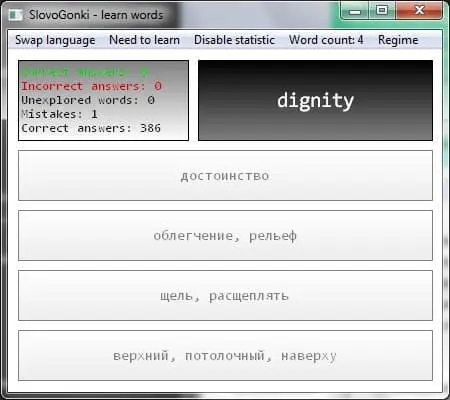
That's why, many years ago, I already wanted to write my own program for learning words, one that would solve these problems my own way. Back then I knew only C++ and couldn't program anything more complex than basic stuff in WinAPI. I did try to write such a program, but even the very simplest part of the interface took me an enormous amount of effort. In the end the project was abandoned. For those interested, here are the links: 1, 2.

jpg
#Today's result
But now I can program very complex interfaces using ImGUI, so I decided to try writing this program again, only this time as a hackathon: timing myself and trying to make it as fast as possible.
And as a result, I got a program that runs in the browser at this address: optozorax.github.io/learn_words.
Its source code and binaries are here: github.com/optozorax/learn_words.
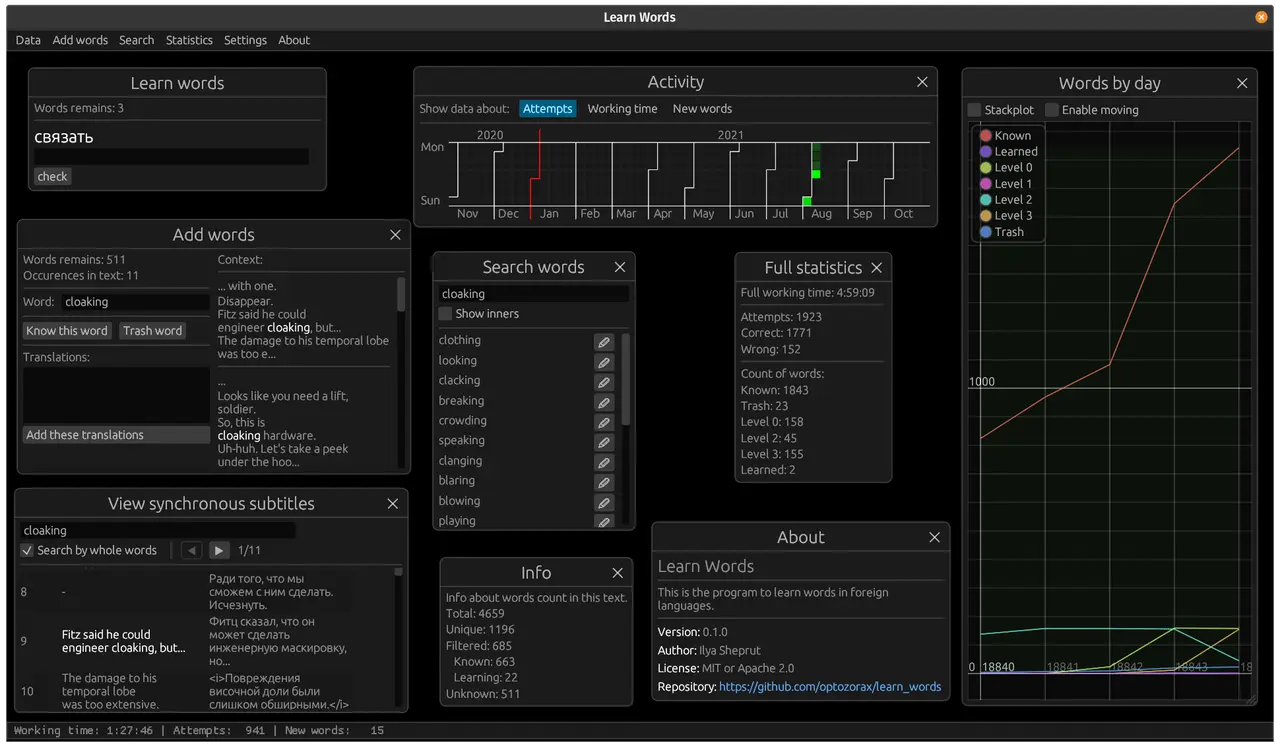
Here is a screenshot with almost all the windows of this program, to grab your attention, so to speak:
png
#How words are tested
I think learning words with tests, where the right translation is already written and can be found by elimination, is a lost cause. The translation has to be actively retrieved from memory. I know this because my first program worked exactly that way, and it was awful: I didn't remember anything. And picking the distractors so as not to give away too many hints is a whole hassle of its own.
So I decided that words should be learned by typing them on the keyboard. That is, you're shown a word, and you have to type all of its translations by hand.
You can't type a word several times in one day and then remember it forever; memorization has to be spaced out over time. After a word is added, there's a specific schedule for when you have to type it again:
- On the first day, 2 times with a hint; the hint is there to help you memorize the word.
- On the first day, 3 times without a hint; from then on everything is without hints.
- Two days later, 3 times
- A week later, 2 times
- 20 days later, 2 times
- After all that, the word is considered learned
- In between, the word isn't offered for typing.
These numbers were pulled out of thin air. I plan to move them into the settings, so that you can make your own modes and even imitate flashcards, where a word may be repeated just once a day, with a hint, every day for a whole week. I don't know which approach is more effective; this topic needs research.
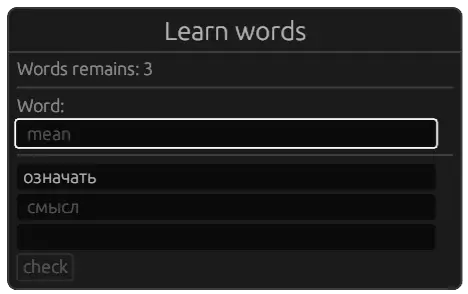
Below you can see how several different translations of the word "mean" are typed.
png
When you type with a hint, you have to type the word in both English and Russian, because I caught myself typing only the Russian hint when going fast.
The first translation, "означать" ("to mean"), we've already learned and don't need to type; the second translation, "смысл" ("meaning"), has to be typed with a hint because we added it only recently; and the third translation, "грубый" ("rude"), we've already typed with hints, and now we have to actively retrieve it from memory. In other words, this program takes into account that a word can have many different meanings.
You can move between these fields with Enter.
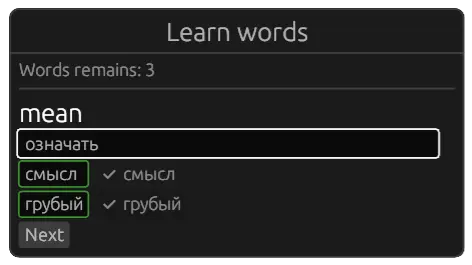
After typing, you can press the "Next" button and see how we did.
png
This window offers both English words for which you have to type the Russian translation, and the other way around. I think this alternation is very important, because I noticed that some words are easy to recall when you see them in one particular language, and very hard the other way around.
This way I solve problem 1 from the introduction.
#How words are added
In programs for learning English words, usually all the words with their translations and meanings are already built in, so you launch it and start working. I'm not a megacorporation, I'm making this program primarily for myself, and I want to get a result as fast as possible, so I decided not to bother with that. I chose the path of adding words manually.
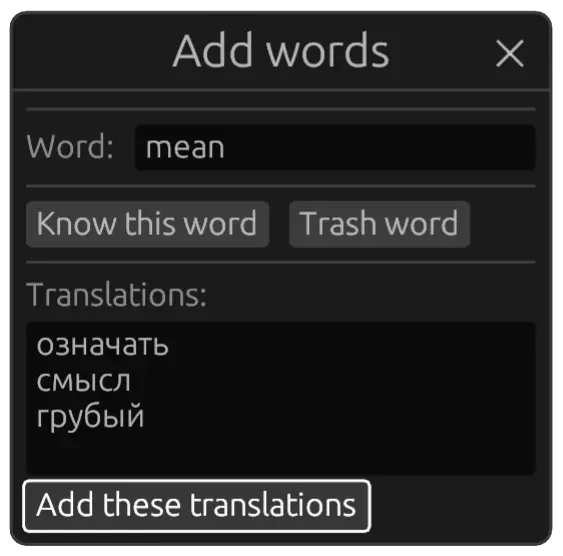
A word together with all its translations can be added manually. This means that you yourself have to know which word you need to learn, and look up its translations yourself.
png
This solves problems 2, 3 and 4 from the introduction.
#2Adding from text and subtitles
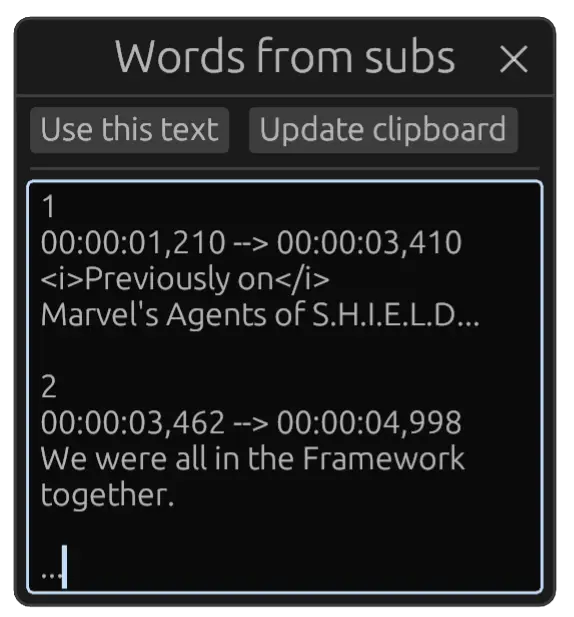
For this there's a special window for importing from subtitles in the srt format.
png
Then you can press the "Use this text" button.
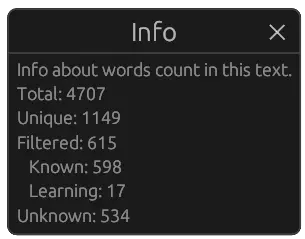
The program tells us how many words of each kind it found in this text. I think this is an extremely effective way to find unknown and known words.
png
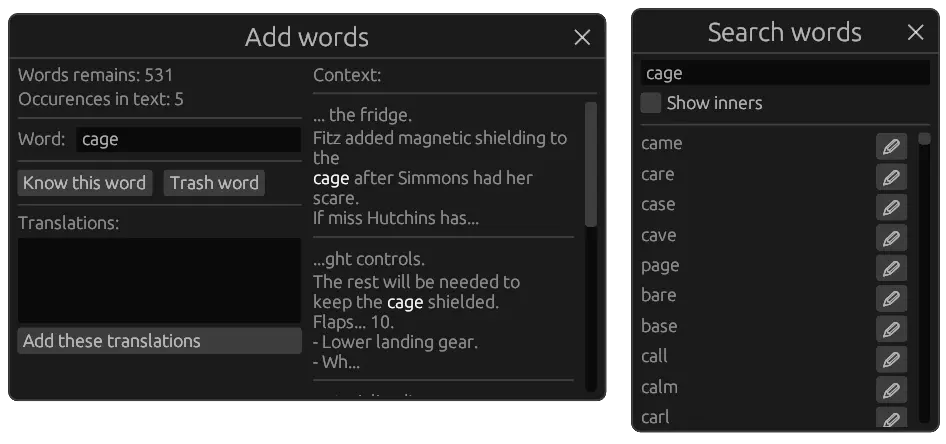
We also get a window that has parsed all these words and asks you to enter information for each word.
png
After you add information about one word, it automatically moves on to the next word.
There's a button for "trash" words. These are artifacts of subtitle parsing, for example <i>, Mack:, O-o-o-okay. They're stored in the program only so that they get filtered out in the future and don't get in the way. I don't know what the fundamental difference between "Know this word" and "Trash word" is from a programmer's point of view, but let it be.
We can see that these subtitles gave 531 unique words. Don't worry, it won't be like this every time: only the first few times do you have to say for a pile of words that you know them, and after that it gets easier, since all added words will be filtered out of the following texts and subtitles. In the end the program will ask you only about what you really don't know, or what it doesn't know.
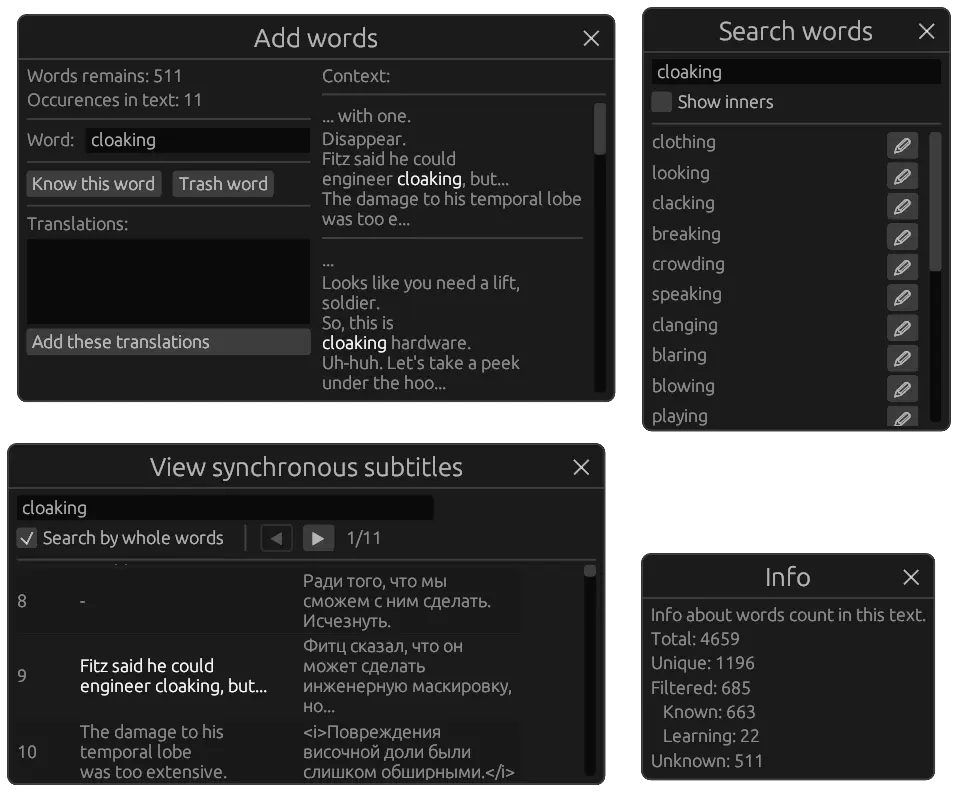
In the "Add words" window, the context of the current word is shown on the right, so you can better understand which translation to pick for learning. And there's a separate window that searches for the word in the database of words you already have. In the search window, the query is updated automatically when the next word is selected.
You can add words from a plain text in the same way. Before reading an article, you can simply copy it to the clipboard, paste it into the program and find out all the words you don't know.
There's a problem here, though: I don't do any word normalization (stemming or lemmatization), so words with -s and -ing count as different words, and you'll have to manually say "yes, I know this word" for all of them. Because of this, the database also has to be N times bigger than it would be if words were normalized. I didn't do it for the sake of simplicity, and because normalization tools are usually distributed as .exe files or as libraries that are very hard to use. Or the normalization databases come with license restrictions altogether.
Also, set phrases, idioms and other multi-word things aren't detected automatically: words are split only by spaces. So if you want to learn something like that, you'll have to add it manually.
By the way, downloading subtitles from the internet probably doesn't even count as piracy, so here are some useful links for you:
- About sites for downloading subtitles, on the Movavi website (in Russian)
- Subtitle Seeker — subtitles in English.
- opensubtitles.org — there are Russian subtitles here, but of dubious quality. So it's better to take the subtitles that come with the film or series on you-know-which site.
This solves problem 6 from the introduction.
#2Synchronized subtitles
While adding words, I realized that the English context alone isn't enough: sometimes I come across words that I just can't understand. And here the work of professionals who have already translated these subtitles into Russian would come in very handy.
So I have a window where you can paste two different subtitle files, English and Russian; the subtitles must be for the same episode or the same film.
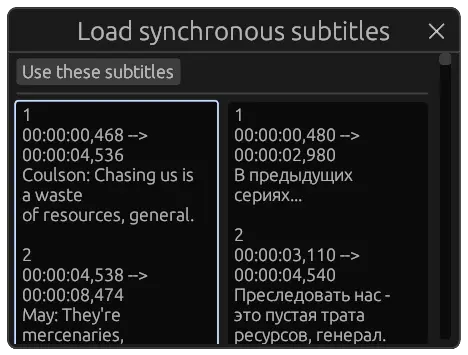
png
And then, when you add a word, the scroll automatically jumps to the Russian-English pair for this word in the subtitles. Of course, the algorithm that aligns the subtitles isn't perfect, but it's off by only 1-2 lines, which isn't very critical.
png
With this feature, adding words is incredibly convenient. Do you know if such a feature exists anywhere else?
#Statistics
A program for learning words implies that you'll work in it regularly and spend a significant amount of time in it. And since you're spending that much, you'd like to see what exactly the results are. So a lack of proper statistics can kill the motivation for any activity.
First of all, there's a panel at the bottom that shows the statistics for the current day. I saw a panel like this in VerseQ, a touch typing trainer, and I liked it a lot. It's very satisfying to see that today I did this much work in this much time, and it also helps me keep myself in check.

png
There are also full statistics:
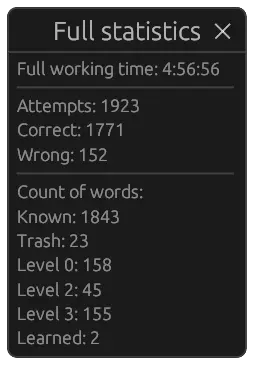
png
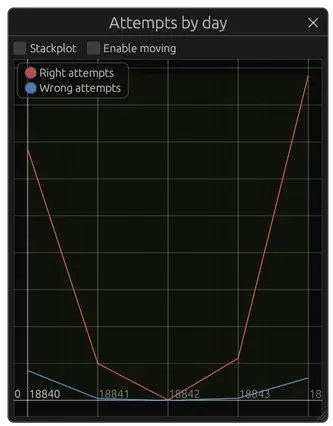
You can view statistics by day: the number of words in each category, time spent working, the number of attempts.
png
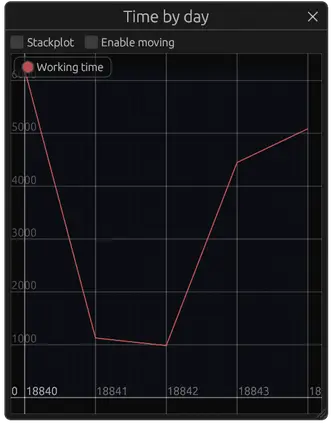
png
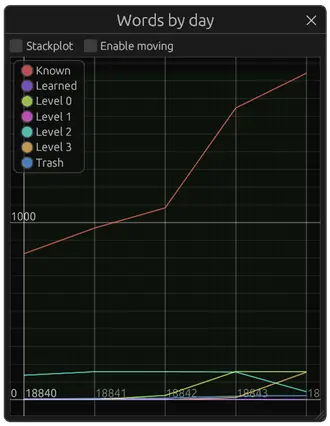
png
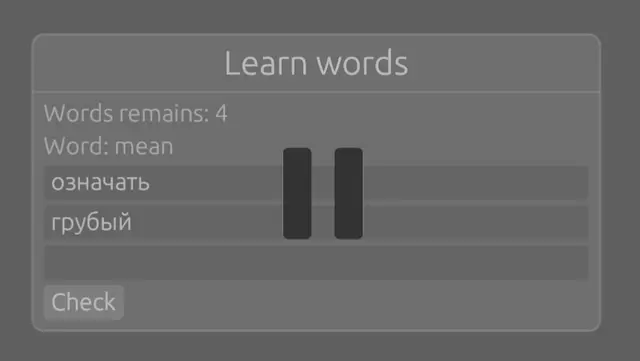
By the way, since time is measured and then shown in the statistics, it can happen that you step away while the program keeps measuring. And you don't want to see such garbage data in your statistics. So after 15 seconds of inactivity, time stops being measured, and the whole screen fades out with the familiar pause icon.
png
#2GitHub-like
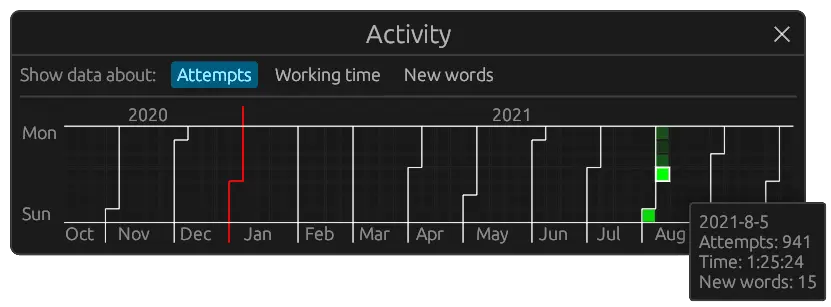
GitHub's contribution graph is simply a stroke of genius. This visualization really should have its own name, because it should be in every service and program where you can do something regularly. Visualizing your work like this pushes you to work well now because you worked well before, lets you take in all your work at a glance, and encourages you to keep at it every day.
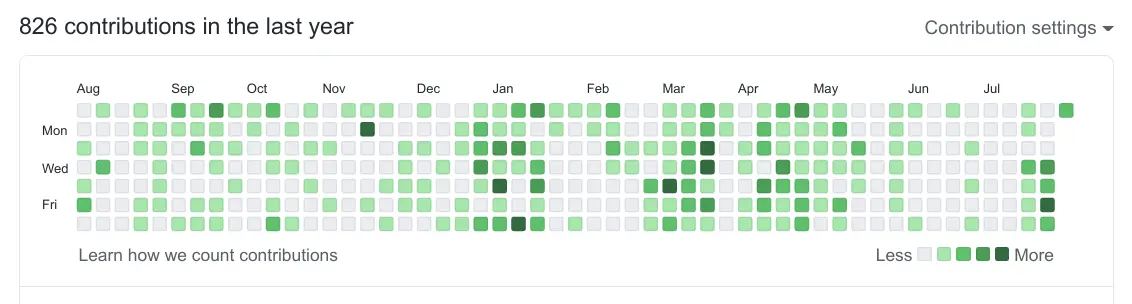
png
So I simply couldn't make my program without this feature.
png
And I even made it better: in mine you can scroll this graph, you can also choose which of three different metrics to visualize, months and years are separated by lines, and most importantly, the week starts on Monday.
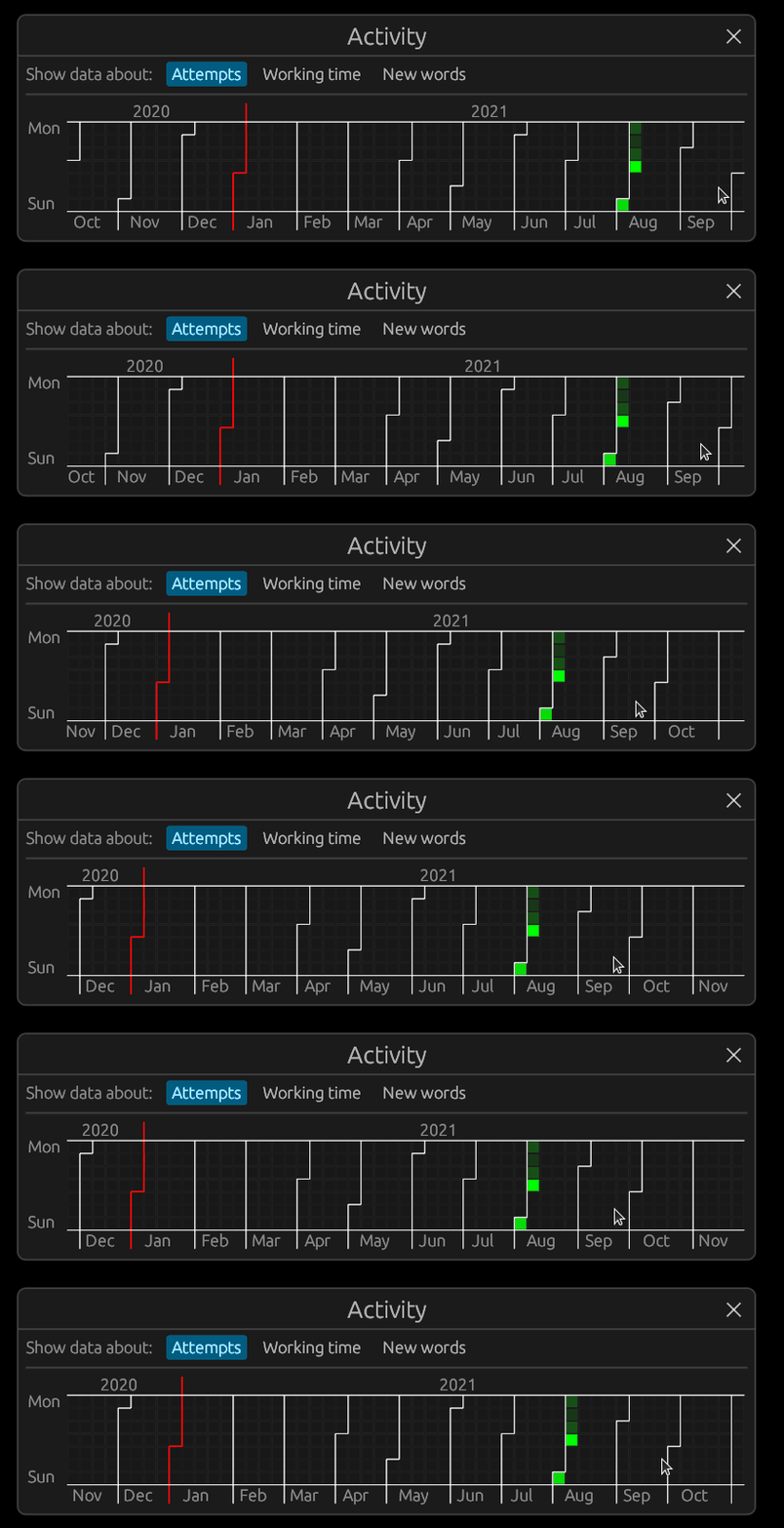
This window always opens automatically when the program starts, so that right away you see how much you've worked and get motivated to work now.
#Automatic layout switching
In my program, Russian and English translations come in random order. So you might have to switch the keyboard layout all the time. When you type a translation, the program knows exactly which language it should be in, so the language can be switched automatically.
I implemented it like this: there's simply a hash map that knows, for each English letter, which Russian letter it corresponds to, and vice versa. So when you need to type a Russian word, you just type it as if the Russian layout were on, and the program fixes everything by itself. The good thing about this approach is that the program doesn't need any special permissions to switch the layout. For example, in the browser via WASM it's definitely impossible to switch the layout, for security reasons. But the bad thing about this approach is that it won't work for language pairs that use the same characters on both sides, like English and German. If more than 2 people ever use this program, I'll think about solving this problem.
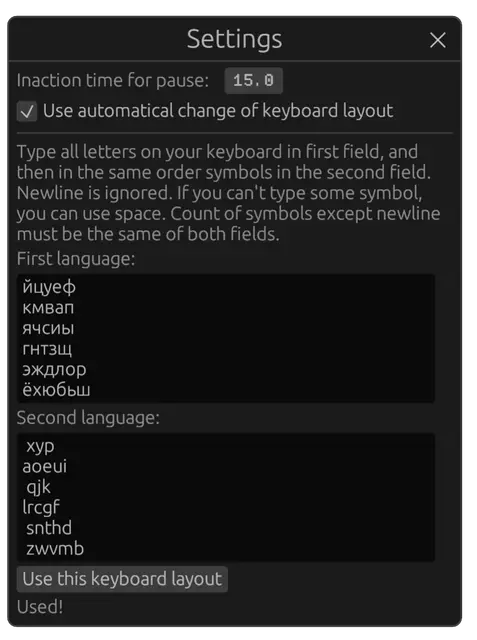
In the settings you can specify your layout by entering all the Russian letters in one field and all the English letters in the same order in the other. The newline character is ignored, and a space can be used when you can't type the needed character at all. The good thing about this approach is that you can have the most insane keyboard layouts, like Dvorak or Diktor, and automatic layout switching will still work.
png
I put my own layout there, and switching layouts costs me zero time in my head, although I've heard that some people may find it hard. There's room for features here too.
#Platform
The program can run both in the browser and as a native application.
In the browser it runs entirely locally on your machine: I didn't buy any servers, all the computation happens on your side. And I love this approach, WASM is wonderful. So it's simply an application that you can open in the browser without downloading anything, and that will exist independently of me.
The only difference between the browser and the native program is how your data is stored. In the browser it's stored via the Web Storage API, which persists after you close the tab or the browser, and apparently can even work across different browsers on the same computer.
#Data export
For the local application, all your data and statistics are in a single file local.data next to the program, but it's unclear what to do with the browser data. What if I want to reinstall my OS, how do I get my data out?
Specifically to solve such issues, I made it possible to export and import all the statistics via the clipboard. The user is simply handed this information and can store it however they like.
I think this is a very important feature for absolutely every program. I don't really trust all these cloud programs that store my stuff somewhere out there, with no way for me to download all my data or put it into another account.
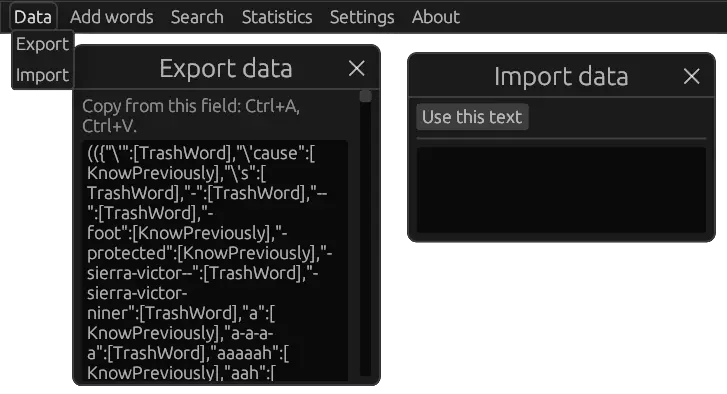
png
So you'll be able to use this program even if GitHub dies or I abandon it.
#Almost any language
I call it a program for learning English words, but in fact it can be used to learn any words in any two languages. The whole design of the program is language-agnostic, be it adding words or automatic layout switching.
Right-to-left languages and CJK characters aren't supported yet, because the libraries I use aren't that powerful yet. So you could say the program can be used to learn *almost any language.
#Open-source
This is an open-source program of 3.5k lines, which means you could quite realistically make your own changes to it if you're interested. That's a good thing compared to programs that are too big to wrap your head around.
#WIP
But this program is in a WIP (Work In Progress) state, which means that you personally may find some features missing. If you use this program, write to me about bugs or features you need, and I'll think about it.
#Usage
I've been using this program for 5 days now, and during that time a lot of holes turned up that needed features, which I successfully fixed, but quite a few other, less critical holes remain.
On the first day I spent a lot of time adding words from the very first episode of "Agents of S.H.I.E.L.D.":
- It came to 900 unique words.
- Of these, I didn't know 70.
- Filtering all that and translating those 70 took me 50 minutes.
And that's for an episode that lasts 40 minutes. So watch out that you don't spend too much time adding words. Split it into short chunks so that you don't spend too much time on it every day. Or add a lot of words in advance, and then each day pick the right number of them to learn.
Then I tried to learn all these 70 words in one day. Why not, it's not many words, in theory it should be quick. The result:
- Actually there are ~140 words, because both Russian-English and English-Russian pairs are added.
- If each pair has to be typed 5 times on the first day, that's 700 attempts minimum in total.
- It took me 762 attempts: 681 correct and 81 incorrect.
- And all that was 55 minutes of continuous time.
There were so many incorrect attempts because it's hard to keep track of 140 words; I often forgot them.
So my plan to learn all the words from an episode before watching it failed: that's too much for one go. I think you could try to learn all the words of some series or film before watching it, and spoilers from just the subtitles shouldn't matter much, since you can't make sense of anything, and it should be forgotten anyway.
I think the optimum is to learn 10-20 words a day, so that it takes 20-30 minutes a day at most, but to do it literally every day. Also, you shouldn't learn too many words a day, because each day you have to type not only the new words but also the words learned 2, 9 and 29 days ago.
In the program you can choose how many new words to take for today's practice:
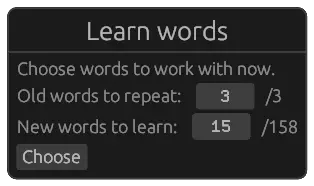
png
#Conclusion
Now I learn words with my own program. I'll definitely publish my results and thoughts in a month or more.
I implemented this program in full accordance with my worldview, my vision of which features are essential, and my attitude to whether overcomplication is worth it. And I like that, because in my opinion a lot of programs do things wrong, and I can say exactly what should be added to them or how they should be done differently to make them better. By the way, on this topic you can read my Ideas page.
But on the other hand, I did the wrong thing by not studying the market of similar programs well enough, in particular the much-praised Anki. So it turns out I was reinventing the wheel again. I've been cured of destructive perfectionism: I no longer refactor code 10 times over; now I just need to be cured of reinventing the wheel.
I made this program with its core features in 18 hours of pure working time, which is incredibly fast for a program with a GUI. The minimal working version was ready in 6 hours. Thanks for that go to the ImGUI concept, which makes building interfaces incredibly easy and fast, as well as to my ability to plan a program and to Rust's static typing. I fully documented the process of planning this program and every stage of writing it, so soon there will be an article about how it was written and about how I collect ideas and organize myself to write programs. The article may be useful both for beginners and in terms of how more experienced and smarter people will criticize it.
So subscribe to my Telegram channel if you haven't yet: @optozorax_dev (in Russian).
#UPD: update 0.2.1
It's now August 11, 2021, and I'm releasing version 0.2.1 with the following features:
#2Moving to egui-web
- It's now actually possible to use the program on a phone.
- IME works for typing CJK characters and non-standard symbols.
- The light theme looks better. Some of its colors still need work, though; this will be fixed in the next versions.
#2The "Learn Words" window
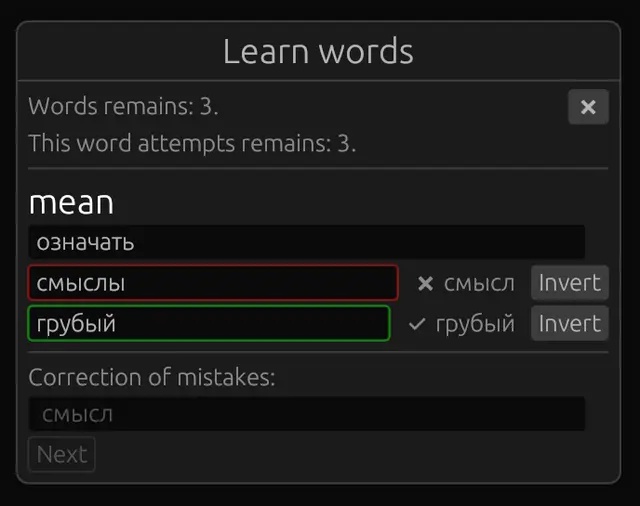
png
- You can invert the grading of an answer. For example, if you got one letter wrong or typed an absolutely equivalent synonym.
- If a word was typed incorrectly, you can't go further until you type this word with a hint.
- Improved the input field with a hint. Now it simply doesn't let you go further until the hint is typed correctly, and glows green when the hint is typed correctly.
- Now you can move between fields not only with
Enterbut also withBackspace. - Now all translations of each word are added together to the learning queue of the current session. Previously, you could learn the Russian-English pair on one day and the English-Russian one on another, depending on your luck with the random number generator, and that turned out to be inconvenient in practice.
- Now the oldest words are picked for review first, rather than in random order.
- Now all the words with hints are typed first, and then all the words without hints. Before, they were mixed, and it could happen that you were given a new word at the very end of typing all the words. I think it's better to type all the new words first, and then retrieve them from memory together with the ones being reviewed.
#2The "Add subtitles from ..." window
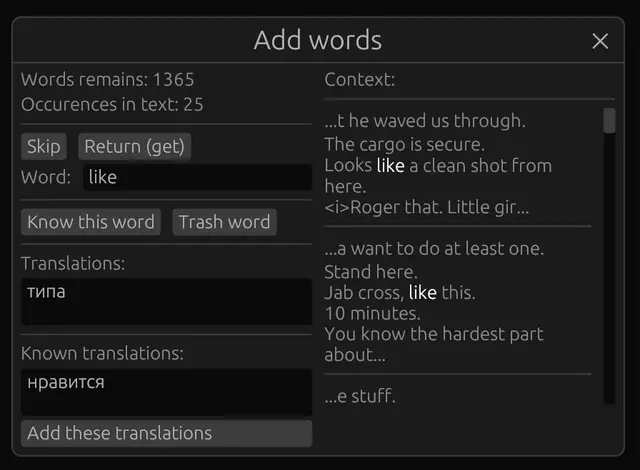
png
- You can add known translations for this word.
- You can skip words. This can be handy if you want to add only the known words from a text and skip the unknown ones, leaving them for later, or if you don't want to deal with a very hard word right now.
- You can now go back to the previous word.
#2The "Edit word" window
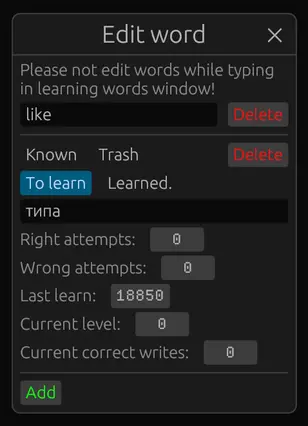
png
- Fixed bugs.
- You can add and remove translation items.
#2The settings window
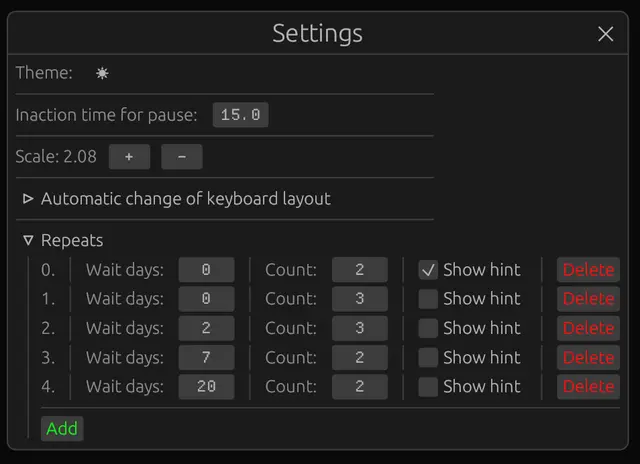
png
- Now you can set the number of repetitions and the intervals in days, and generally configure the program's behavior however you like: to make it work like Anki, or the way you prefer. For example, some people advise learning words like this: during the first week, repeat a word once every day. You can set that up too.
#2Other
- Fixed how the current day is determined.