
#What it is
Immediate Mode Graphical User Interface (ImGui) is a pattern/concept/idea of how a library for graphical interfaces can be organized/implemented. The concept is implemented by libraries that you can add to your project and use in your code.
Examples of such libraries:
- Dear ImGui — the most popular library. Everyone calls it just ImGui 😑, which causes a lot of confusion. The library was originally written for C++, but there are bindings for JS, Python, Rust, .NET. I haven't used it.
- By the way, there are two demos that run this library in the browser by compiling C++ to WASM:
- egui — an extremely promising GUI library for Rust. I've made interfaces almost exclusively with it, so you can assume this whole article was written under its influence. I think things should be about the same in Dear ImGui, but that's just an educated guess.
- And this library supports running in the browser officially and out of the box: demo.
Be sure to open the web demos and see what they look like.
#The gist
There are classic interfaces, which, as I understand it, are called Retained Mode GUI. I don't know them in depth, and I only worked with Delphi many years ago. As far as I remember from that experience, to create a button you need to:
- Declare in advance that this button exists, draw it in a special window, choose its size, etc.
- Set a callback function with a name like
on_button_click_1337, which will be called every time the button is clicked.
Whereas to make a button in ImGui, all you need is a single line of code:
if ui.button("Next").clicked() {
  // do on click
}
No drawing, no callbacks: the button press is checked right now, and if the button isn't pressed right now, nothing happens. That's where the name Immediate comes from.
If you want something more complex, here's an example taken from the egui readme:
ui.heading("My egui Application");
ui.horizontal(|ui| {
    ui.label("Your name: ");
    ui.text_edit_singleline(&mut name);
});
ui.add(egui::Slider::new(&mut age, 0..=120).text("age"));
if ui.button("Click each year").clicked() {
    age += 1;
}
ui.label(format!("Hello '{}', age {}", name, age));
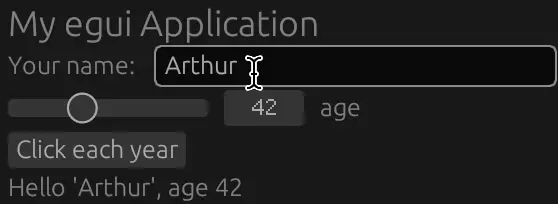

png
While in retained mode you set the coordinates of every widget, here you describe the widgets top to bottom, left to right. Their coordinates are calculated automatically, and everything is laid out compactly.
You can also create widgets in a loop or inside an if, and everything will work just fine:
for i in 0..10 {
    ui.horizontal(|ui| {
        if ui.button(i.to_string()).clicked() {
            ui.label(format!("{} is clicked", i));
        }
    });
}
This creates 10 buttons arranged top to bottom, and if you click one of them, a label saying that it was clicked appears to the right of it at the moment of the click.
Can you imagine doing this in retained mode? It lets you abstract and reuse interface elements really well, without complicated classes, inheritance, Dependency Injection, etc.
#How it works
While it's at least roughly clear how retained mode works (and we're used to it anyway), for immediate mode it isn't obvious.
- The ImGui interface is called in a loop, and each iteration of the loop counts as one frame.
- Before the frame starts, the library has to receive all the data about the mouse position, pressed keys and other input.
- Then a function is called in which the library user gets the
uistruct and draws their interface. At this moment the library builds all the widgets in real time, determines for each widget whether the mouse is over it, and generates the vertices and triangles that will be drawn later. - Now the library returns all the generated meshes and hands them over to the backend for drawing. The backend draws them on the screen.
- And this repeats at 60 frames per second.
The catch here is that we don't know in advance whether some widgets will be there or not, as we would in retained mode, which means the whole interface has to be built completely from scratch every frame.
#Pros and cons
- Writing interfaces is very easy
- A perfect fit for Rust's borrowing rules
- Hogs computer resources
- The layout can't be computed automatically
On the subject of pros and cons, I recommend reading the egui readme, which explains it all well. Some of the points here I'm just retelling.
#2Writing interfaces is very easy
- To create a button, all you need is to write one line inside an if.
- All the information about the interface is stored in a single variable,
ui, which you just pass around to the functions that need it. - You can reuse complex interfaces simply by writing a function, without creating a class, inheritance, etc.
- The interface and the data can't get out of sync, because the whole interface exists only right now. You can tie the existence of the interface directly to the data.
- You don't have to think declaratively or asynchronously: all the interface code is written imperatively, top to bottom, from the past to the future.
Really, just try it yourself. You'll see how easy it is.
#2A perfect fit for Rust's borrowing rules
Rust is very strict about references, and I can't even imagine how you could write a retained mode GUI in it without using Arc<RefCell<_>>. After all, there an input field has to know where to put its input, and at the same time that information has to be stored somewhere other than the interface itself.
In ImGui you don't need anything like that at all: since the data is accessed only right now, you can pass ordinary references. Let's look at how an input field works:
ui.text_edit_singleline(&mut name);We simply pass it a mutable reference to a string. If some characters were typed during this frame and the string changed, it will have changed by the time the function returns.
#2Hogs computer resources
Recomputing the whole interface every frame takes a lot of computation. In retained mode almost everything can be computed in advance, storing only the results, including the whole array of widgets, and only the parts that change need to be redrawn. In ImGui that's impossible: everything is computed and drawn anew every frame.
This means it consumes:
- RAM
- CPU
- Battery
It also means that your program can't run on weak hardware that can't do these computations 60 times per second. Retained mode, on the other hand, runs perfectly well on weak hardware.
Or it means that your program will steal resources from other processes that also want to do something every frame, and overall the program will run slower.
Although on modern hardware this isn't that critical.
#2The layout can't be computed automatically
Another problem is that we don't know what comes next. This is a strength, because you can draw widgets in a loop or through an if, but at the same time it means you don't know what the final size of the whole window will be. So the window size is calculated after the fact.
The first downside of this is that your window will behave strangely when resized. You can see this here. The library's author also explains there why this is reasonable behavior for ImGui.
The second downside is that it'll be hard for you to put widgets into a table or a grid, because to draw a grid properly you need to know the size of a cell up front.
egui does manage this somehow, but I wouldn't count on it working perfectly.
#You have to accept the rules of the game
We're very used to interfaces in the retained style. And when you use ImGui, it's tempting to make an interface like the ones you've seen before.
Or you feel like complaining that ImGui is different.
But I realized that none of this is needed, you just have to accept the rules of the game. You have to accept that:
- You'll burn CPU cycles.
- Your windows won't be able to react to resizing properly.
- You'll place all widgets top to bottom, left to right, with no manual placement by coordinates.
- Your windows will grow in height rather than width, because you won't be able to make decent use of the space to the side.
You just have to come to terms with this and think about interfaces within these limits. Then you can use ImGui as effectively as possible in your life. After all, simplicity like this doesn't come for free.
#What is it good for
With all its downsides, ImGui looks like it isn't made for serious interfaces such as Photoshop, browsers or messengers. So what could it be good for?
#2Pet projects
You might write a pet project for several reasons:
- To learn some technology
- For fun
It isn't a good fit for the first case, but it's a great one for the second. Usually when you write a pet project, you want to spend as little time on it as possible and get a result as quickly as possible, because you can't spend 40 hours a week on it, and you also have to live a normal human life somehow.
This is where you can happily accept all of ImGui's downsides as a trade-off and just not care about them, making an interface that simply works.
#2A program for a few people
Say you work at some company, and there are non-programmers who need a program with a graphical interface to handle some internal processes, because they don't know how to use console utilities or write code.
In this case it's clear that the program won't be released to the outside world, it's needed by a few people, and spending huge resources on developing a retained mode interface for it is simply unreasonable.
So you can afford to write a program for them in ImGui with just one or two developers.
#2A rarely used program
Say you're making your own program for creating keyboard layouts, like MSKLC. How much time in total will each user spend in your program? If you're lucky, each user will spend 5 hours in your program over their whole life. Because they'll set up their layout once or twice and call it a day.
Given such a short usage time, you can make a lot of sacrifices so as not to spend too much time on development. Here you can get away with a program that drains the battery, doesn't look perfect, can't resize properly, and so on.
#2A prototype
I recently wrote a program for learning English words, and only after I had written it and used it for a few days did I realize which features I badly needed. I wouldn't have come up with these features without writing the program, no matter how smart I was.
In today's world everything is moving toward the idea that the truth is found only in prototypes. You should release a product to users as early as possible and polish it only after getting feedback.
This means that you can write a prototype of a serious program or of some feature in ImGui, try it out in practice, find the missing features, and only then write it properly, for millions of users, in retained mode.
#What I've made with ImGui
#2The Tenet of Life
The very first project where I got to know ImGui was a simulator of reversible cellular automata. There I simply used the ImGui that came built into the macroquad library to display some text and make a couple of buttons.
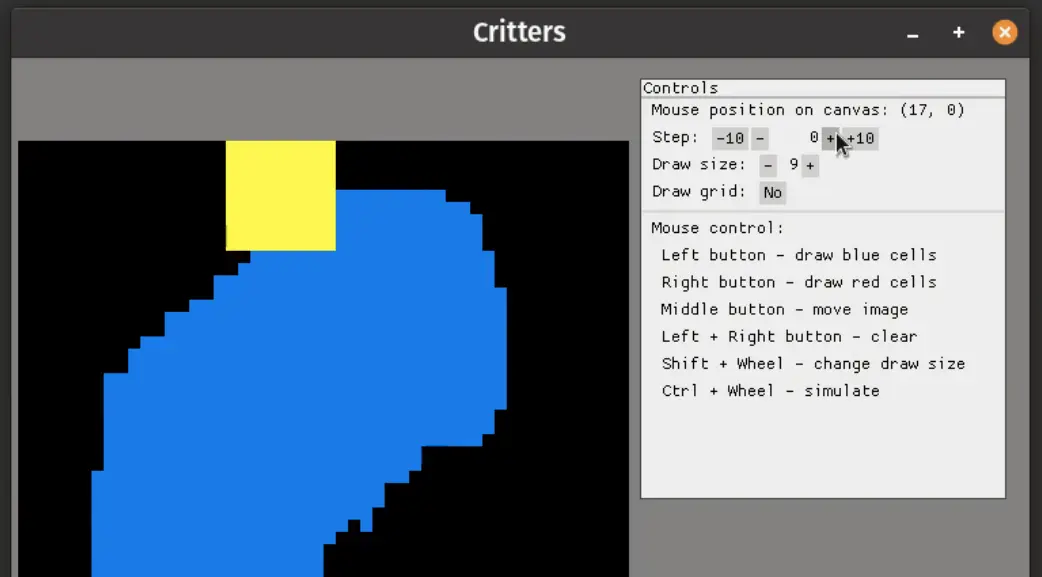
png
It may seem like such a simple thing, but it radically changed the usability of the program, because before that all my programs with graphics were controlled exclusively by pressing letter keys on the keyboard, which were listed in a text file help.txt. For example, that's how it was in my program from 2015 (in Russian).
#2Portal Explorer
I used to render scenes with portals from code, using ray tracing. To move or rotate something, I had to edit the code and recompile the project. At some point I got tired of it and wanted to rotate things in real time.
I made it possible to rotate matrices through the interface and see the result in real time.
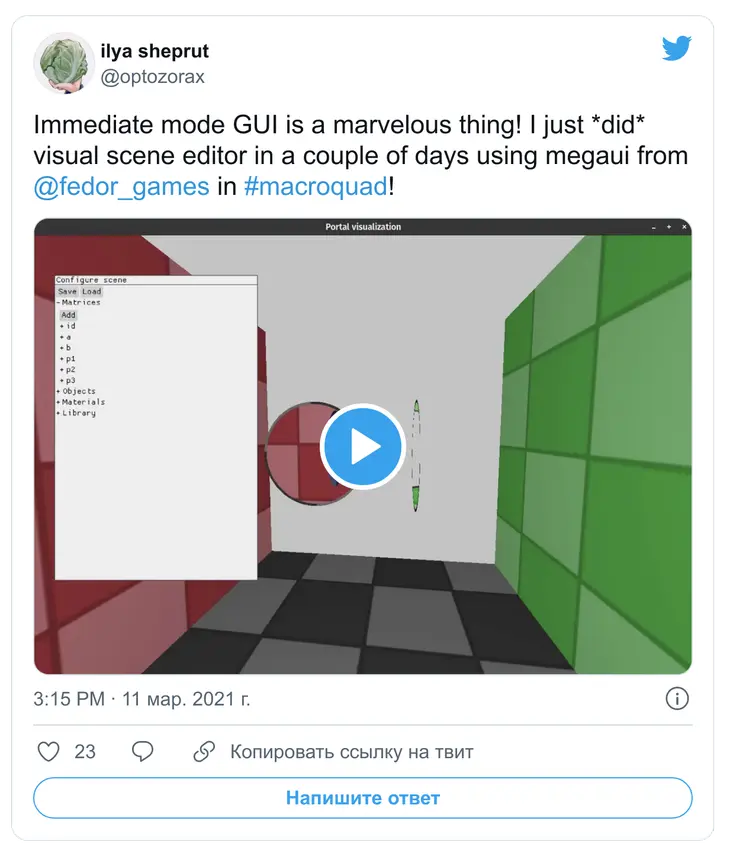
That turned out to be too easy, I felt a surge of fairy-tale hero strength, and went ahead and hacked together a whole visual editor in ImGui:
png
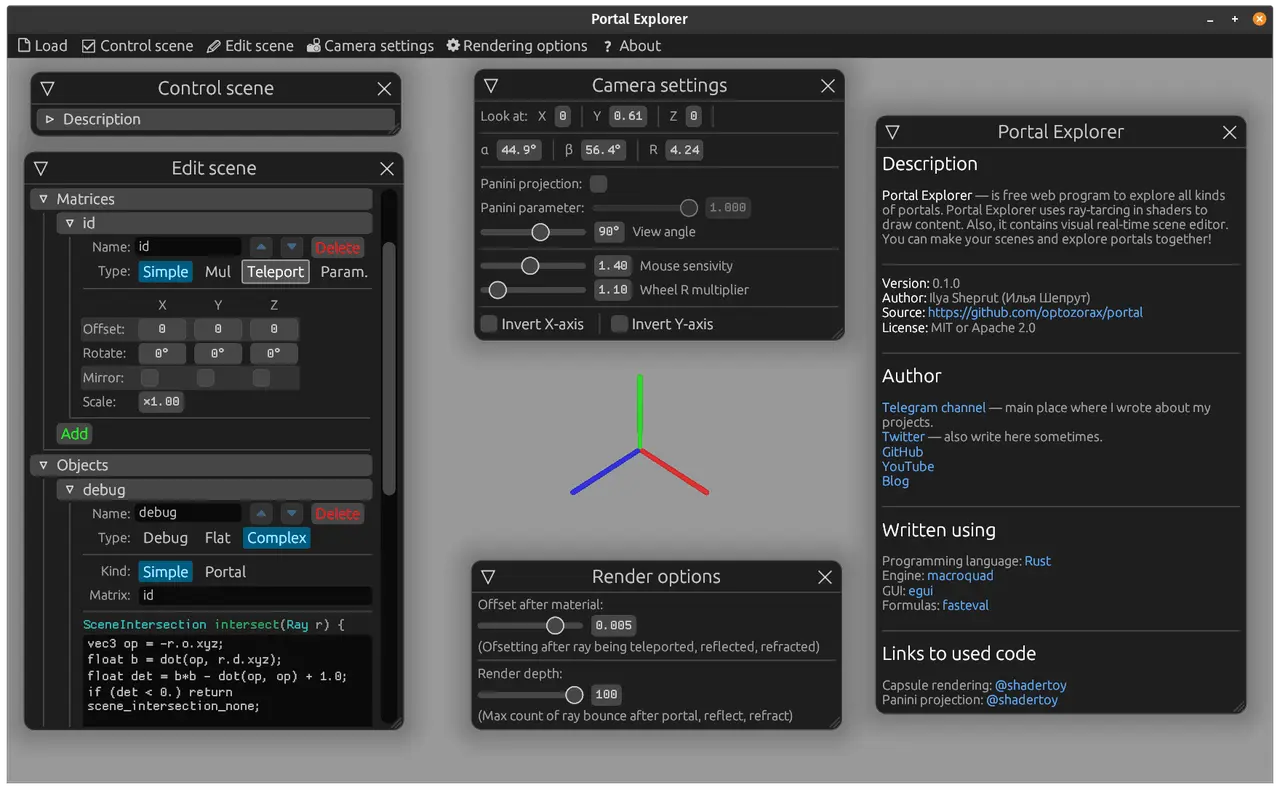
With it I could already edit matrices, objects and their shader code. It made creating scenes an order of magnitude easier, which made me more productive. The best part is that I made it in just a couple of days and it simply worked. That's the most pleasant feeling about using ImGui.
You can read more about this in my Telegram channel, starting here: @optozorax_dev/351 (in Russian).
And after that I went all in: I started making complex interfaces, inline elements, formulas (both in Russian), and an interface that defines another interface.
You know, when I was planning all this, at first I thought: "Well, I'll make it possible to describe portals in Rust structs and then generate code from them. But, damn, that's such a pain, there's so much to do." And here I went and did not only that, but also built an interface for all of it. I never even dreamed of the result I have now.
That's how much power ImGui gives you. From absolute zero to a sophisticated real-time visual editor for 3D scenes within a single project.
png
#2Learn Words
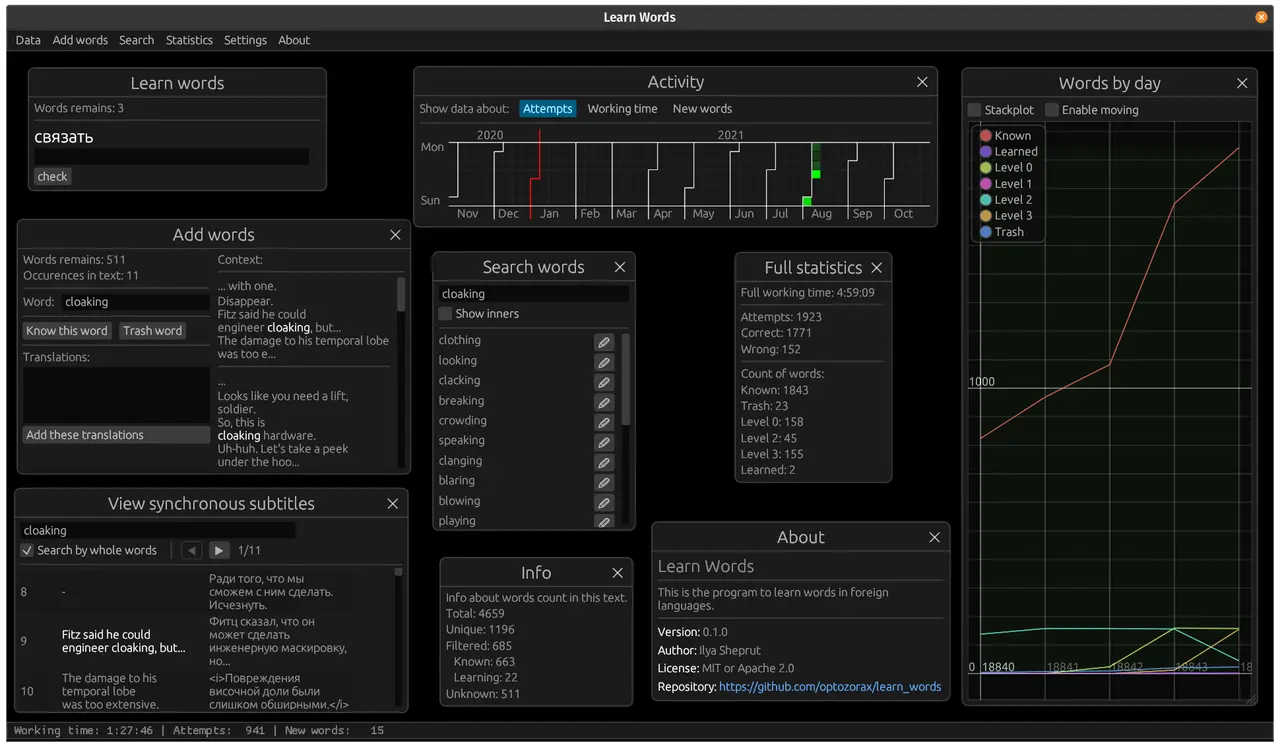
I wrote an article about this project. What's special about it is that, while building the product, I decided to test the hypothesis that with ImGui I would write a program very quickly. And I did. Quickly. The minimal working prototype took 6 hours of actual working time, and finishing the project completely took 40 hours of actual working time. And that's even though the program is built entirely around a graphical interface, and it has some fairly complex elements.
I would never have written a program like this in retained mode.
png
#Similarity to console utilities
People usually write console utilities as pet projects, and so do beginner programmers, because they're simpler, because they don't require you to figure out too much and rack your brain.
ImGui offers exactly the same advantages. And if school kids used to start with console applications because they're simpler, now they can start with ImGui.
I'm sure that if a school kid starts making their programs and seeing the result in ImGui right away, the whole process will be 10 times more interesting for them than entering data from a file or in the console. This increases engagement and the potential for learning to program.
I hope educational programs will adopt this and teach school kids ImGui from the very first lessons.
#Conclusion
ImGui allowed me to create graphical interfaces for the first time in my life. And these interfaces don't just make the program a bit more convenient than pressing letter keys on the keyboard, they radically change how I interact with my own product (the visual editor).
This kind of interface has its pros and cons. You just need to understand when it can be used and when it can't; you need to accept all its limitations, and then you'll reap the maximum dividends.